





































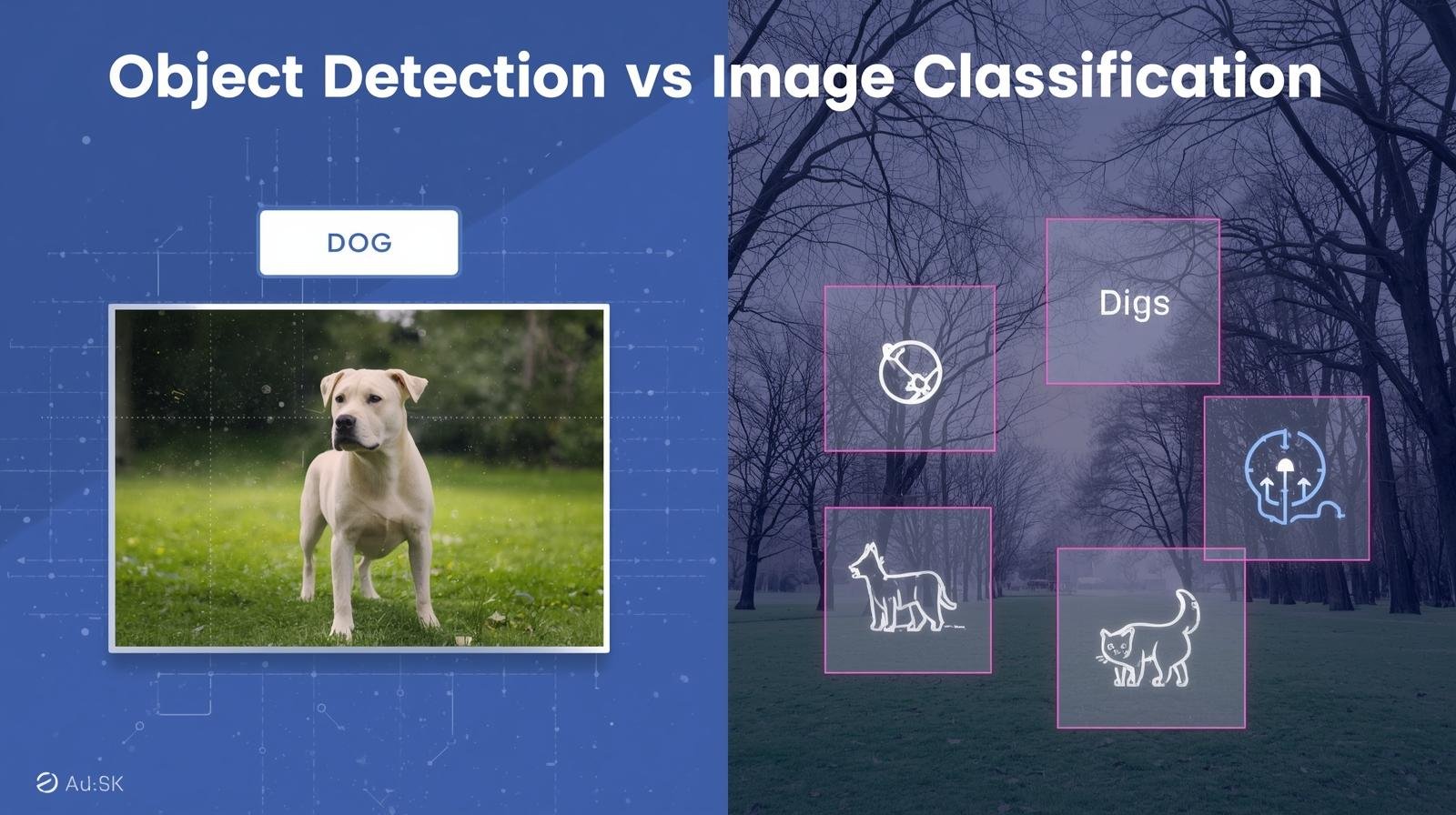

Do you recall using your mobile device to search for “cat,” and after doing so, all your cat pictures were shown? That is artificial intelligence working. Can you think of a time when you used your phone to find a particular individual in a group photo and had your phone automatically suggest that you tag that individual? This, too, is a form of artificial intelligence; it is vastly different from the previous one.

Image Classification is the first step (finding all your cat pictures), which simply identifies what the overall image represents by labeling the entire image; for example, #beach or #dog. Object Detection is the second (identifying a particular face in a group photo), which is much more complicated. It looks to identify one or more objects in an image and then determine the exact location of each object through a bounding box.
A key distinction between the two types of identification lies in the nature of the questions they are attempting to answer. Image Classification answers the question “what is the primary subject of the image?”, and in many cases, is a useful tool for organizing very large collections of photographs.
Object Detection is a much more difficult process as it asks “what subjects are included in the image”, and “where are those subjects located within the image”. It is essential to understand that Object Detection has many applications in the real world, where machines must interact with their environment meaningfully rather than merely classify it.
Understanding the differences between these two fundamental forms of computer vision will help individuals better understand how computers are developing the ability to visually recognize and interpret the world around us and how this technology impacts our daily lives, whether through autonomous vehicles, automatically scanning items at checkout lines, etc.
What is Image Classification? Think of It as Giving Your Photo One Perfect Hashtag
Image classification is a form of Artificial Intelligence (AI) designed to identify what an image depicts based on all the information contained within it and provide that as a single label. As a result, image classification works similarly to assigning a single, perfect hashtag to an image.
For example, you take a picture of a Golden Retriever running through a park after catching a Frisbee. The system recognizes the overall scene, identifies the majority of the objects shown in the image as Golden Retrievers, and assigns the image the label “Dog”. It does not recognize the Frisbee or the Trees within the image, but rather a high-level representation. Image classification can be used to group large collections of images into simple categories (such as “Beach”, “Food”, etc.), but may run into issues when images contain more than one important element.
For example, if you have a picture of both your Cat and Dog, the image classifier will need to decide which element to classify. Generally, the classifier will just choose the first element it sees. More importantly, image classifiers don’t know where elements appear relative to one another within the image.
They only know that some element (like a “Dog”) appears somewhere in the image. This is exactly why we need a different method of identifying where objects exist in an image for things such as tagging your friends in pictures on Social Media, or assisting a Self-Driving Vehicle navigate from Point A to point B.
What is Object Detection? It’s a Digital Treasure Hunt in Your Pictures
Object Detection is a more complex variation of Image Classification. Object detection can be thought of as a digital treasure hunt. While Image classification returns a single title for the entire image, Object Detection provides a list of the individual items of interest within that image.
This will allow the AI to recognize multiple objects in an image, and not just the first or most obvious one. Instead of having to determine whether to label the pet as either a cat or a dog, Object Detection will label it as both a cat and a dog.
Additionally, to classify objects, Object Detection must include their locations in the image. Object Detection accomplishes this by drawing a rectangular border (called a bounding box) around each object classified in the image.
If you were to take a photograph of your pets, Object Detection would find both the cat and the dog in the image, place rectangular bounding boxes around each, and label them accordingly (the cat labeled “cat”, the dog labeled “dog”). Essentially, instead of just being generally aware of there being animals, the computer will show you where the particular animals are located in the image.
#How Image Recognition Works: From Pixels to Intelligent AI Decisions
The most fundamental distinction between a simple image-sorting application and a complex application that uses artificial intelligence to recognize images and provide recommendations for tagging your friends in a photo is how the application interprets the image. the first is based on the question of “what does this picture represent?” and the second is based on the question of “what objects can I find in this picture and where are they located?” once you compare the methods for categorizing/labeling your images you will see that the main difference between the two is that one is a single label and the other is multiple labeled boxes.
The Main Difference: A Single Label vs. Multiple Labeled Boxes
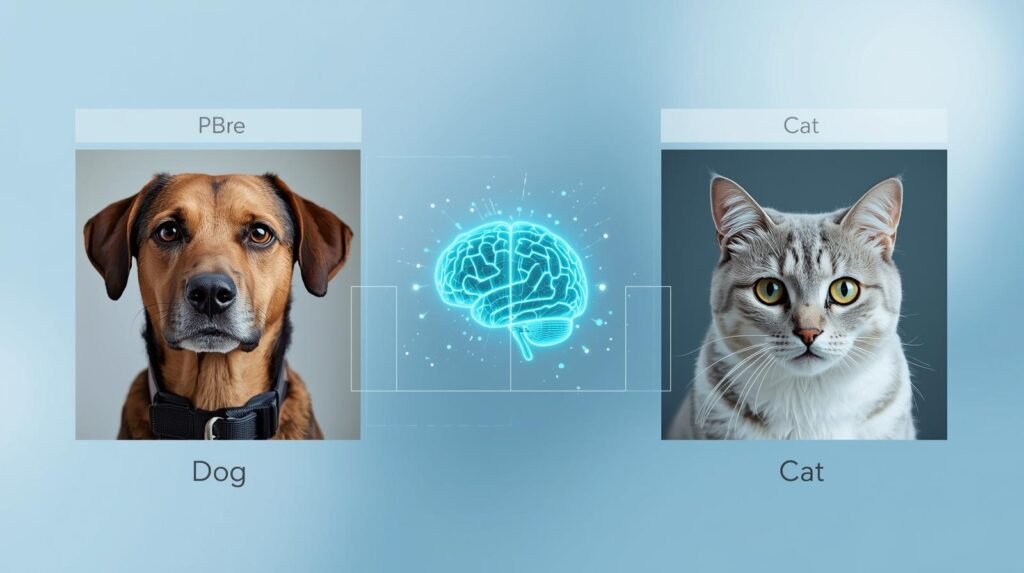
There are few ways to realize the basic difference between classification and detection systems than to visualize how they analyze the same image. For instance, take a picture of a cat and a dog playing in a yard and give it to both a classifier and a detector system. A classifier will look at the whole image and provide a single label (for example, “dog”) based on what object is most visible or prominent within the picture.
In contrast, a detector does essentially an itemized list of objects found in the image. Not only can it identify an object, but it can also determine its location in the image and assign a unique identifier. So the output of a detector would be multiple labels, rather than a single label (for example, “dog” here and “cat” there), as depicted in the image. One type of system provides the name of the movie (the title), while the other identifies the main actors in the movie.
How Do Computers Learn to See? It’s Like Teaching a Toddler
A child learns about objects such as cars through experience and exposure to examples, rather than by reading definitions in a dictionary. For example, a child could see large red cars and small blue cars and have the parent point out which one was a car. Through repeated exposure to these examples, a child can develop a connection between what defines a car and other things they have learned.
To train a computer to make the same type of connections, computer developers expose the artificial intelligence (AI) to millions of images that were previously labeled by a human. An image labeled as a “beach” would allow the developer to present the AI with a beach image and label it “beach” when the image is shown.
To train an AI for Object Detection, the developer will expose the AI to images labeled by someone else (e.g., a person labeling each pedestrian with a bounding box) and label pedestrians as “person.” The initial step of exposing the AI to these labeled images is referred to as Data Labeling. Data Labeling creates the equivalent of millions of digital flashcards for the AI.
Data Labeling provides the AI with the information it needs to find patterns in images; however, it does not allow the AI to actually “see” the images as humans do. The AI does not experience the sensation of walking on the sand at a beach, and it does not determine whether a vehicle is dangerous. Instead, the AI looks at all the pixels in the image and draws conclusions based on the millions of images it has seen that were labeled by humans.
The AI concludes that a particular combination of color and shape has an extremely high likelihood (e.g., 98%) of being labeled as a “car.” The method used to create computer vision systems is primarily based on this type of logic.
Image classification and object detection difference:
Classification of Images: “What is in this image?”
Typically, image classification assigns one (and/or multiple) labels to the entire image, e.g., “cat,” “dog,” or “car.” Most classifications produce a class name(s) along with a confidence level. Classification doesn’t show where in the image the object(s) may be found, but instead, if the image includes those object(s) (or likely contains those object(s)). Examples of typical applications for classification can be seen as:
1. Photo Tagging: Tagging photos so that people can see what’s inside.
2. Quality Control: A pass/fail system to check if something meets certain standards.
3. Medical Screening: When the general label of the image is enough to determine if a person has a certain condition or disease.
Object Detection: “Where are the objects in this image?”
An object detection application asks: What objects are in this image? Object detection identifies all objects in the image, surrounds each with a rectangle, and assigns a class label and confidence level to each rectangle. Example: “Person: .92” at some x,y coordinate. Detection is used when the locations of the identified objects matter (e.g., for Autonomous Vehicles (cars/people), Retail Shelf Inventory (item counting), Security (where people are located), Robotics (grasping objects), and Sports Analytics).
Example:
Image: a person walking down the street.
Tagged by object detection:
Rectangle #1 = Person: 0.92 @ x=300, y=400
Rectangle #2 = Car: 0.80 @ x=100, y=50
Rectangle #3 = Building: 0.95 @ x=150, y=200
The fact that detection is a form of localization means it has historically been harder to perform and more computationally expensive than classification, because detection requires a different type of data.
Classification Data: The image and associated label(s)
Detection Data: The image and associated label(s), and the bounding box coordinates for each object.
There are many other differences, including how they are evaluated: Classification is usually evaluated using accuracy/F1 scores, while Detection is usually evaluated using IoU (the percentage overlap between a box and the ground truth) or mAP (how well an object is localized).
An additional task beyond detection is image segmentation, which goes one step further by labeling every pixel in an image, allowing for more precise boundary definition.
When is Just a Label Enough? Real-Life Examples of Image Classification
Large decisions can be made very quickly through tagging a photo using a single word or phrase. For instance, when searching for all pictures of beaches from your past travel experiences, there is no need to open every picture individually to determine if they were an “ocean”, “lake,” etc., since you have tagged them as “beaches.” Your cell phone has done the same, by bringing up all the pictures of beaches you have ever taken based on that single tag.
Image Classification has many uses in many everyday items you use. For example:
- Content filtering: Millions of images are viewed by the software on social media to help decide whether something should be reviewed by a person who may find it objectionable.
- Medical imaging: Medical professionals can quickly review scans and label them as healthy or anomalous, allowing them to focus on anomalous scans.
- Using online shopping: The software that allows you to view only red shoes or denim jackets when you choose to use the filter option on an e-commerce site.
In every one of these examples, the ultimate goal is to achieve a very high level of performance in identifying images or objects. As such, the systems do not need to identify each object/image individually; they can determine the image as a whole. The systems are well-suited for managing large collections of digital materials (e.g., family photographs, product catalogs, medical records).
While there are many advantages to using such simple systems, the disadvantage is the limited detail they can provide. For example, if a self-driving car has to identify the exact location of a stop sign so it knows it is on a road, then a single label will not provide the necessary information to support that level of detail.
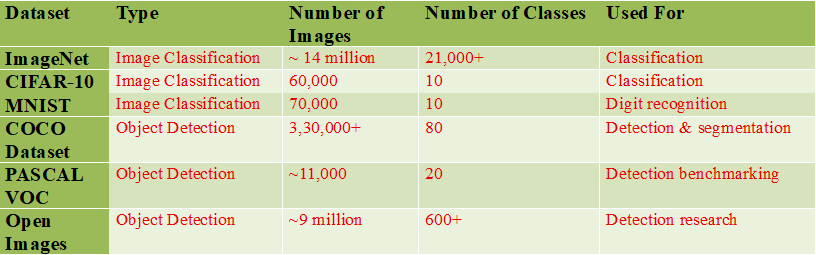
Computer Vision – Dataset Statistics
Why Knowing ‘Where’ Matters: Powerful Object Detection Examples in Your Life
The “where” in object detection represents a significant advancement over traditional classifiers. While a traditional classifier categorizes a photograph into a single, vague category, an object detection system functions like a comprehensive inventory manager, finding and labeling every item in an image.
Object detection significantly increases the level of intelligence over previous capabilities in systems designed to interact with the physical world, as it identifies the locations of specific objects. A self-driving vehicle is a good example of this type of system.
To enable a self-driving vehicle’s computer vision to properly recognize when to apply its brakes at a stop sign, it must first determine the physical location of the stop sign along the street. Object detection provides the self-driving vehicle’s computer vision with the spatial awareness it needs to create a virtual “bounding box” around pedestrians, vehicles, and traffic lights along the road. In turn, the object detection creates a structured map of the street environment that the self-driving vehicle’s computer vision can interpret.
The use of this same technology has already proven to be successful in different settings. As an example, when the self-checkout machine at the local grocery store can identify the apple on the scale rather than the bananas beside it, that is object detection at work. The same object detection technology is also used by a photo application installed on your mobile phone to identify and isolate individuals in a group photo before attempting to name them.
The object detection capability will enable computers to quantify and describe relationships among objects and to support real-time interaction. With the ability to play “I Spy” digitally at a high level, there will be significant improvements in user safety and convenience. Are we really saying it is harder for a computer to find an object than simply naming it?
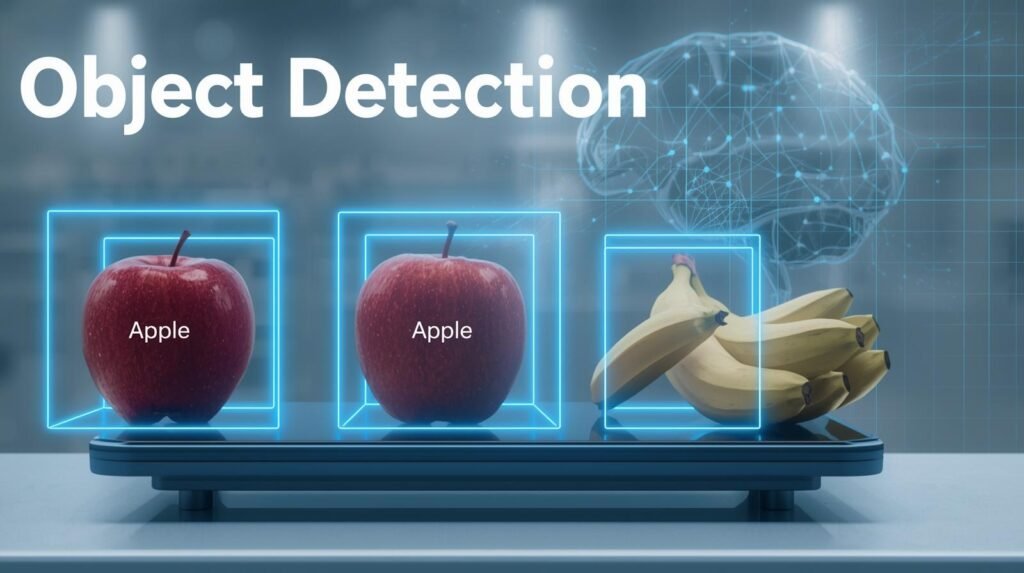
Image Classification vs Object Detection vs Image Segmentation in Different Levels
Three of the most widely recognized computer vision tasks are: image classification, object detection, and image segmentation. The key difference among these three tasks lies in what is being predicted and how detailed that prediction is.
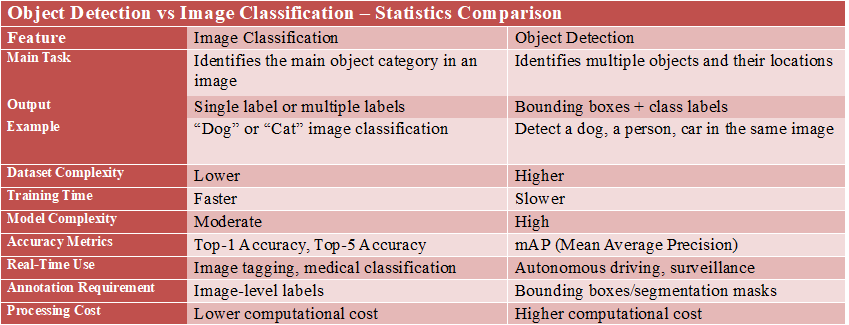
Image Classification (Coarse/High Level – Image-Level)
What does it answer? “What’s in this picture?”
Predictions: A label for the whole image (or possibly more than one label), accompanied by a confidence score (or scores) for each prediction.
Example: The image is labeled as “Cat,” or “Cat + Sofa,” etc.
When would you use it?: Use this when all you need is a yes/no or category decision, and when the object’s location within the image is unimportant — Photo Tagging, Content Moderation, Basic Defect Detection, or when there are enough features in a Medical Image to support an image-level diagnosis.
Data Needed: Typical: Image + label(s).
Object Detection (Medium detail; Object level + Location)
What question does this answer? “What objects appear in the image, and where are they located?”
Output: A set of bounding boxes with class labels and confidence levels. May be applied to an image that contains one or more types of objects.
Example: Street scene (cars, pedestrians, traffic lights, etc.) with each box identifying a separate object.
Apply This: When an approximate position is needed for counting, tracking, or autonomous applications—Autonomous Vehicle, Surveillance, Retail Shelf Inventory, Robot Pick & Place, Sports Analytics.
Typical Data Required: An image plus class label information and bounding box coordinates for each object.
#What Is Computer Vision: How AI Smartly Sees the World
Image segmentation (fine detail, pixel-level)
The question this addresses: “Which pixels (in the image) belong to each (object, category)?”
Pixels have been labeled as belonging to a class (the road is all “roads”) in a mask. These are the two most common:
• Semantic Segmentation: The class has been assigned to each pixel (all “roads”)
• Instance Segmentation: A separate mask is used for each instance of a particular object (each car).
Example: Clearly define the border of a tumor from an image or clearly define what part of the road a vehicle may use.
Used when: Precise definition of object edges is important; medical imaging; background removal; exact study of objects; mapping; crop vs weed identification; and advanced autonomous vehicles.
Common Data Requirements: An Image + pixel-accurate masks (more expensive to manually create labels).
Quick rule of thumb
- Need what only → Classification
- Need what + where (roughly) → Detection
- Need what + exact shape/boundary → Segmentation
Model Performance Comparison between Image Classification and Object Detection

(Accuracy varies depending on dataset and training configuration.)
Is Finding Objects Harder Than Naming Them? A Simple Breakdown
Image classification is easier for computers to perform than object detection. Consider an analogy to describe the difference. Classification is like labeling a photograph with a single word or hashtag (e.g., #park). Detection, on the other hand, is like having a pen and being asked to circle each tree, person, and dog in the same photograph. In the former case, classification involves more steps and greater precision than in the latter.
Training the AI to classify images is much easier than training it to build a detection system. For instance, a human could easily show an AI a thousand pictures labeled with a single label, such as “cat.” However, if we were to train an AI to automatically draw a rectangle around every cat in each of these thousand pictures, the amount of detailed information needed to train the model to recognize the cats makes the detection process significantly harder from the start.
Identifying a specific object, such as a car, or, more precisely, drawing a “bounding box” that encompasses all the pixels that represent the car, requires significantly more “thought” than identifying a person. The system has to identify all possible objects (e.g., cars), find the x- and y-coordinates of each object’s bounding box, and then label each object with a measure of how confident the system is that it is a car.
Therefore, the significant increase in complexity from the simplicity of just sorting photos to the level of processing that is required of the brain of a self-driving car represents the difference between a simple photo sorter and a more advanced AI-based system. There are many instances in which an object can be identified as a specific type because it is sufficiently detailed; however, there are also many cases in which an object does not provide enough detail for the system to properly identify it.
Going a Step Further: When You Need to Color Inside the Lines
While a bounding box will locate a vehicle, if you need to know exactly what the vehicle’s shape looks like, consider using a bounding box to locate it on the road. A good example of when a bounding box will not work well is when you are trying to cut out an image of the vehicle from the ad so you can put it in another ad.
If you were to place a square bounding box around the vehicle, the resulting bounding box would likely include parts of the road and sky, making the final image look unprofessional and fake. In cases where the accuracy requirements are this high, computers require something better than just a bounding-box approach.
At this point, we have all the necessary information to start Image Segmentation. By using Image Segmentation, instead of simply putting a box around an object, you give the computer a digital crayon and instruct it to draw with that crayon, each and every single dot that forms the object itself. The result is a perfectly accurate, pixel-level boundary that effectively creates a stencil isolating the object from its surroundings. The primary difference between object detection and image segmentation lies in the progression from a general box to a precise shape.
You have likely already witnessed this very efficient technology in use. If you have ever used a virtual background during a video call, the software was required to accurately delineate the edges of your body and hair to separate you from the physical area behind you (the room). As stated earlier, this is one of the most common applications of computer vision as described in this section: Image Segmentation.
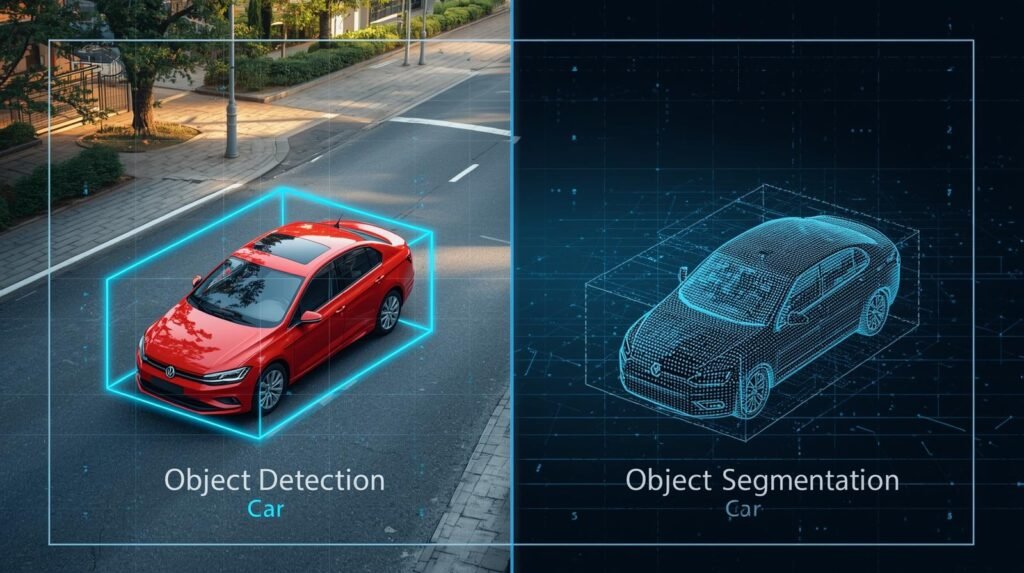
Classification or Detection: Which Tool Do You Need?
Conceptually, image classification versus object detection can be thought of as an idea or mental model. For instance, image classification (the picture), is essentially applying one hashtag to the picture. Object detection (the picture), is making a treasure map for the finds using boxes.
If you need to determine whether you will use technology to help you complete your project, or do your project without technology, you should ask yourself one of the two following questions:
1. Do I need to know what is in the image? (Example: categorize photos as “beach”, “city”, etc.) If so, then that falls into Image Classification.
2. Do I need to know what is in the image and where it is located? (Example: How many cars are in a parking lot; etc.) If so, then that falls into Object Detection.
This concept helps take away some of the mystery behind the Artificial Intelligence (AI) you see in your daily life. For instance, when your smartphone gallery shows all of your dogs’ pictures, you have successfully recognized the images. Similarly, when a self-service checkout machine recognizes each item in your shopping basket, it has successfully detected objects in the images. In contrast to a computer’s ability to “see”, this concept provides you with the practical information on what questions the technology was designed to answer.r.














Comments 4