





























Think about that one thing you do all the time — copy number information to a report, sort files, etc., and input customer information. That is boring and redundant, and you know there has got to be a better way. Wouldn’t it be great to hand that job over to an automated digital assistant that does it for you, perfectly, each time?

That is the main promise of Robotic Process Automation (RPA). The “robots” in RPA are not physical machines from the manufacturing plant floor; these are invisible software robots living on your computer. These digital employees are programs you train to use your applications in the same manner a human employee would – by making clicks, typing, and moving around on screens.
#Revolutionary Smart AI Improves Manufacturing Quality Checks
If you were training a new intern, you would first give them a step-by-step guide: “1st, open that spreadsheet. 2nd, copy the customer’s name. 3rd, open our sales application and put that customer’s name into this box.” A software robot also learns in exactly the same manner. It replicates screen actions and keystrokes on the computer’s user interface perfectly, every time.
The end result is to enable you to step away from tedious, routine tasks so you can focus on tasks that require a human element, such as solving complex issues or conversing with customers. However, a standard bot is simply a follower and cannot think. As such, we call this type of automation rule-based—it follows only the specific rules and instructions it was programmed to execute. For example, if you instruct it to copy data from “column C,” it will never waver and always copy from column C.
It uses no judgment in deciding what to do. As mentioned earlier, these digital assistants are excellent at producing consistent results; however, like real-world assistants, they vary in style and capabilities.
Summary
The article describes how RPA (Robotic Process Automation) uses “digital robots” — software designed to mimic how we interact with computers every day through clicking, typing, etc. (i.e., moving information from one system to another and completing repetitive forms and processes).
The article also defines two types of automation — Attended (a bot is triggered by an employee to help complete a task in real time — i.e., a call center agent receives assistance from a bot to find a customer’s information); Unattended (the bots operate independently on predetermined schedules — e.g., the company’s bots will run nightly for accounts payable processing).
The article then demonstrates how combining automation with AI yields a new form: Intelligent Automation. Through technologies such as OCR (which allows the digital robot to read and utilize text found within a scanned document); and NLP (which enables the digital robot to comprehend language and intent), digital robots can now process unstructured data (e.g., an email or pdf receipt) rather than only being able to follow strict rules to accomplish a specific task.
The article provides real-world examples of this automation at work—specifically, using HR onboarding, accounts payable, and customer service copilot to create multi-step workflows across departments and applications.
Ultimately, the article frames the “digital workforce” as a team of digital robots collaborating together, freeing up humans to focus on customer-facing interactions, process improvement, and exception handling, rather than repetitive execution — the article asserts that while automation may replace certain jobs, it will ultimately result in creating more jobs.
Robotic Process Automation (RPA): Digital robots automate repetitive computer tasks quickly and accurately

Robotic Process Automation (RPA) is a form of technology that uses “Digital Robots” (bots) to rapidly execute repetitive, rule-based computer tasks. Bots simulate the keystrokes, mouse clicks, copy/paste, and navigation a user performs when using various online applications, such as web apps, spreadsheets, email, portals, and legacy systems, often without requiring changes to the original applications.
Traditional automation typically operates at an application level, while RPA operates at the user interface level. This enables connecting processes that operate across multiple systems, departments, and other areas.
Common use cases for Robotic Process Automation (RPA) include invoice processing, onboarding new customers, data entry, report generation, order updates, account reconciliations, and data transfers between help desk, CRM, and ERP systems.
Most typical Robotic Process Automation (RPA) bots can log in, extract data from databases, verify that the extracted data is consistent with established business rules, complete forms electronically, generate documents, and send confirmation messages — all consistently, 24 hours a day, seven days a week, and at scale.
The advantages of automation are in its ability to deliver speed, precision, and dependability. Bots eliminate human errors in repetitive tasks, shortening processing times while freeing staff to focus on customer service, exception management, and business process improvements.
#Industrial Robot Arms: A Powerful & Smart Guide to How They Work in 7 Steps
By combining bots with artificial intelligence, robotic process automation (RPA) can be made smarter than ever before, enabling it to perform tasks such as extracting information from documents, categorizing email, and directing workflows based on predicted intent – while still maintaining an organized, traceable workflow.
Practicality and good governance are essential. Robotic Process Automation (RPA) will only succeed if the organization first identifies and selects stable, high-volume processes, then documents all processes in detail, including how exceptions will be handled.
In addition, teams require access control, audit trails, and real-time monitoring to ensure bot use is secure and traceable. Measuring the results of implementing Robotic Process Automation (RPA), including time savings, error reduction, improved compliance, and faster customer responses, will help identify the next set of processes to automate.
In summary, robotic process automation (RPA) provides a straightforward way to create a virtual workforce that performs repetitive, computer-based tasks with precision, enabling organizations to operate faster while freeing capacity to focus on meaningful, people-centered work.
The Two Flavors of Digital Helpers: Your On-Demand Tool vs. The Night-Shift Worker
While there are many types of helper bots in the real world (each with its own job), we’ve identified two primary uses for software bots. One can think of these as either the digital equivalent of calling a helper bot for a specific task or a helper bot that completes a large job while the office is closed. The job at hand will determine which one you’ll want to deploy.
Attended Automation represents the first flavor of the helper bot. This type of helper-bot sits on your desktop waiting for you to tell it what to do – generally by clicking on a button. An example would be a customer service representative on a phone call clicking a button to have an attended automation bot immediately pull together all relevant customer information from three different systems, so they don’t waste time or mouse clicks waiting for the customer.
On one end of the spectrum are attended automation bots, which function like an additional employee, available to collaborate with you to complete a task. The bots run off of a central server as well, but are triggered by you (or someone else) — most commonly through scheduling (e.g., hourly or every night at midnight).
Attended bots operate independently of people, completing a single business process from beginning to end with no human interaction. For example, a bot can run after-hours processing of thousands of invoices, generate a summary report, and email it to the finance team before they arrive at the office in the morning.
Therefore, the decision comes down to collaboration or independence. Is the role of the bot to assist you to be able to accomplish your objectives more quickly (as a “Copilot”) or will the bot run independently in the background performing tasks for you to alleviate some of the burdens associated with having to do the same things repeatedly (as a “Night-Shift Worker”).
- Attended Bot: An independent copilot you initiate to aid in the completion of your current task(s).
- Unattended Bot: An independent worker that operates as a background job based on the defined schedules. Regardless of whether the bot assists you or performs the tasks for you, both types of bots follow the same type of rules — pre-defined, rigid rules. However, as we have already mentioned, there are times when a task does not fit this model; therefore, a new level of intelligence is required to make automation viable.
Workflow Automation: Automating repetitive workflows for faster business operations

Workflow Automation enables businesses to develop and execute repetitive processes by automating routine steps and reducing manual follow-up. Instead of using email, a spreadsheet, or “remember to do this” handoff to pass a task along to someone, Workflow Automation passes the task along to the correct resource (person, team, system), obtains approval when required, sends out notifications, and tracks every action in the workflow for transparency and accountability.
The most basic idea behind Workflow Automation is to create a standardized process for moving a piece of work from inception through to completion. Examples of workflow automation include approving purchases, onboarding employees, escalating customer service issues, reviewing contracts, and following up on leads generated through the company’s marketing efforts.
When a Workflow Automation process is properly developed, it will outline all input parameters, the decision logic, who owns the process, the process timeline, and the path to follow in the event of an exception. This reduces the time teams spend coordinating the workflow, ultimately increasing the time they spend producing results.
Additionally, Workflow Automation has been shown to reduce the time it takes to complete a process (cycle time) and the amount of rework required to complete the same process, while improving consistency across departments and geographically dispersed locations.
#Robot Fleet Management: A Smart Essential Guide in 5 Steps
Additionally, Workflow Automation can be integrated with other automation tools. For example, Robotic Process Automation can automate repetitive tasks that involve interacting with user interfaces, such as extracting data from one application to another, updating legacy systems, or collecting information from web-based portals.
By having Workflow Automation manage the workflow and define the necessary actions, and then using Robotic Process Automation to perform screen-level activities, organizations can achieve end-to-end automation that is both logical and achievable.
Workflow Automation provides a foundation for Continuous Improvement, enables quick identification of Bottlenecks, provides Metrics to track progress, and provides Compliance documentation to support operational effectiveness. Additionally, Workflow Automation can enable Robotic Process Automation (RPA), allowing organizations to automate processes that lack modern APIs. However, RPA must also be governed and audited to maintain a single view of the process.
The success of Workflow Automation will depend on its alignment with Business Rules, the assignment of Strong Ownership, and the establishment of Measurable Goals (e.g., time savings, faster turnaround, reduced errors, increased customer satisfaction). Security and Governance are also important considerations within Workflow Automation to ensure Automations remain Reliable as Processes evolve, through Role-Based Access, Change Control, and Monitoring capabilities.
Workflow Automation accelerates business operations by delivering predictability, Traceability, and speed for repetitive workflows. When paired with Robotic Process Automation, Workflow Automation enables Teams to Scale Routine Work Consistently, allowing them to focus on Decisions, Customer Relationships, and Higher-Value Improvements.
The most successful application of Workflow Automation is when it is treated as an Operating Model rather than simply a Tool, and when Robotic Process Automation is applied to deliver the greatest Reduction in Manual Effort.
Business Automation: Digital robots streamlining daily business operations

Business automation is the use of technology to perform tasks on an ongoing basis with minimal manual intervention, enabling faster, more reliable, and precise business operations. Business automation uses digital robots, rules, and integrations to complete common, routine tasks (collecting data, validating data, updating systems, triggering approvals, sending notifications) so teams spend less time on repetitive coordination.
Consistency is one of the primary drivers of business automation. Consistent execution of processes eliminates errors and improves compliance, making service-level management easier. Typical examples of business automation include processing invoices, tracking order status, onboarding new employees, reconciling accounts, managing customer requests, and generating operational reports.
Automation also increases transparency, as each step can be tracked, monitored, and improved. Digital robots can be a key component of automation, especially when the process involves steps across multiple applications. Robotic Process Automation is designed to replicate human actions in software (e.g., clicking buttons, copying and pasting, entering data in forms, and moving data between applications).
When robotic process automation is used as part of business automation, it enables the creation of seamless workflows that span legacy systems, web portals, and desktop applications that lack current Application Programming Interfaces (APIs), which would otherwise be difficult to integrate.
The benefits of Business Automation, and its implementation, are evident in speed and capacity: tasks that once required hours of work using email and spreadsheets can now take only minutes and can be completed 24/7.
Additionally, Robotic Process Automation reduces the chance for manual errors in high-volume activities while providing an auditable record of all activities. Ultimately, Business Automation will provide your employees the ability to handle exceptions, engage in customer conversations, analyze data, and design new processes – work that requires both analytical and creative thinking.
Business Automation, when implemented properly, begins by focusing on processes that are stable, occur frequently, and follow rules. In addition, define how you will measure success, identify potential exceptions, and develop proper governance (access control, monitoring, and change management) before implementing Robotic Process Automation. Once you have identified areas where Robotic Process Automation will eliminate manual screen work, Business Automation will enable the orchestration of who approves, what happens next, and how results are measured.
Ultimately, Business Automation transforms the day-to-day operations into a predictable, measurable workflow. When combined with Robotic Process Automation, Business Automation will create a scalable digital workforce that streamlines daily business operations and enables organizations to deliver faster, more consistent service.
Automation Software: Software platforms controlling automated digital processes

Automation software encompasses the tools businesses use to develop, manage, and monitor business processes. To avoid manual coordination of business processes, automation software lets you create a workflow diagram, define workflow rules, establish connections between business systems, trigger specific business processes, and monitor their performance within a single integrated environment.
By using automation software, organizations can standardize how employees perform common business activities, making repetitive tasks faster and less error-prone.
Most automation software includes components for building, configuring, and deploying automated business processes, such as graphical workflow designers, integration or connector tools, scheduling tools, role-based access control tools, auditing tools, and reporting dashboard tools.
These components enable organizations to automate business processes, including approvals, data synchronization, ticket routing, report creation, and customer notifications, using workflow diagrams, rule engines, integrations or connectors, and dashboards. Many good automation software products also support exception management: if an exception occurs (when something does not happen as expected), the product notifies a person, rather than allowing the process to continue and potentially result in a failed outcome.
When processes require interaction with user interfaces (such as clicking, typing, and copying data from one application to another), robotic process automation may be a key component of the automation toolset.
Robotic Process Automation simulates human actions on a computer, enabling organizations to automate processes that use legacy systems or applications without APIs. When automation software defines the overall workflow and orchestrates the process, and robotic process automation handles screen-level actions, organizations can automate complex processes across multiple business applications.
Major drivers for investment in Automation Software include: the ability to monitor centrally (i.e., see what is running, when failure occurs, etc.), versioning and change management to reduce risk of damaging critical processes through changes, security controls to define who may edit/workflows/bots, access to data, etc. Additionally, versions of Automation Software and Robotic Process Automation provide auditable trails to help demonstrate compliance and accountability in regulated industries.
The first step in choosing the appropriate Automation Software is based on your use cases and environment. For example, if you require significant heavy UI automation, Robotic Process Automation capabilities, and bot management will be important factors.
However, if you require cross-functional teams to coordinate workflows, look for automation software with robust orchestration, approval, and integration capabilities. Regardless of your needs, Automation Software should be easy to maintain, measurable, and scalable as processes evolve.
In summary, Automation Software is the central command station for all automated digital work. When combined with Robotic Process Automation, this creates a reliable “Digital Workforce” capable of executing routine tasks with high accuracy, while providing leadership with visibility and control over business process execution.
How Do Software Robots Actually “Read” and “Learn”?
What are the steps a bot takes to go from viewing a document to understanding the document? For example, if I were to scan an invoice on my computer, the scanned image is not readable to my computer – it is only an image (picture) and therefore cannot be processed by the bot. First, the bot must be able to convert pixels into usable text for processing.
The conversion of pixels into usable text occurs through Optical Character Recognition (OCR) technology. The function of OCR is similar to a digital magnifying glass – while it will magnify images of text (like when you use your phone to take a picture of a business card or a menu at a restaurant), it will also convert the pictures of text into real text that the bot can now read.
Once the bot can read the text, it must still understand its meaning. In other words, if there are multiple references to an “amount due,” “grand total,” and “balance” in an invoice, how does the bot determine that they are referring to the same item? This is where Natural Language Processing (NLP) comes into play: a form of artificial intelligence that enables computers to interpret human language in the same way a person would.
When the bot combines OCR with NLP, it can “learn” from the thousands of examples it has processed. It can view many invoices using OCR to read the text, then use NLP to identify patterns – such as the fact that the words “total” or “balance due” are typically followed by the final cost. As a result of this learning process, the bot can successfully read and interpret documents it has never seen before, thereby completing tasks that may seem complex for a digital workforce.
From Strict Follower to Smart Thinker: What Makes Automation “Intelligent”?
The basic bot can only copy and paste when given an exact word-for-word command. The bot will never be able to think for itself and therefore cannot adjust when something changes from its original instruction.
Therefore, it’s very similar to a chef who is only allowed to follow recipes exactly; he will never be able to adjust his recipe based on the oven type or the flour available. This is where RPA and AI converge to form IA. IA will enable your bot to “think” like an experienced chef. The chef will know the desired outcome (bake a cake) and can adjust his baking technique to accommodate differences between ovens and flour types. An intelligent bot knows its end result is to “locate the total amount,” not just to “pull the number from cell F5.”
An intelligent bot is also needed to handle the unstructured data found in most of our jobs. Unstructured data includes text from emails, scanned receipts, and clauses from contracts in PDF files. This type of data does not fit into a grid, such as a spreadsheet, and a basic bot will never be able to find or use it. However, an intelligent bot can be trained to find and interpret this type of data regardless of its format.
The ability for a bot to “read” and make sense of information (whether structured or unstructured) is what allows automation to advance beyond the simple, repetitive task-based nature of bots. This enables digital workers to perform more complex processes that require interpretation and judgment. Additionally, this allows humans to focus their time on tasks that require a human touch. So, how do bots learn to “read” and make sense of all of this information? This is done through training with examples.
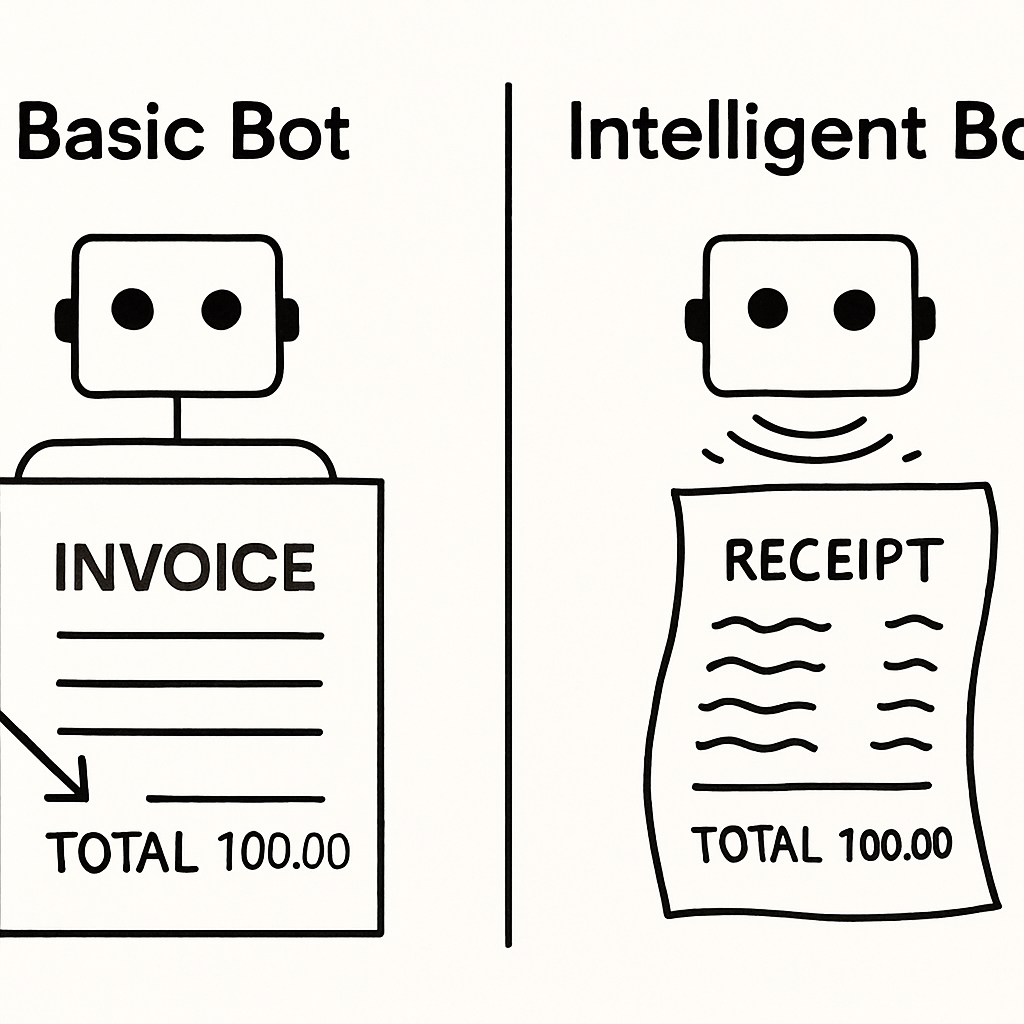
Intelligent Automation: AI-powered systems improving decision-making and efficiency

Intelligent Automation is the combination of automation technology and artificial intelligence (AI) in order to provide better decision support and more efficient business operations. While Basic Automation is a set of predetermined rules followed by an automated system, Intelligent Automation can understand the data it processes, identify patterns, and adjust its actions based on the current situation. Therefore, Intelligent Automation enables organizations to process work faster and deliver more accurate, consistent results.
Most Intelligent Automation solutions include workflow, analytics, and Machine Learning capabilities. These solutions can read unstructured data (such as Emails, PDFs, and chat messages) and extract relevant fields. Once the data has been extracted, Intelligent Automation can automatically classify the request and route the work to the appropriate location. Additionally, Intelligent Automation can suggest next actions, alert when something does not seem correct, and prioritize items based on potential risk or value.
Therefore, these solutions can transform manual processes into smart systems that manage complex tasks without requiring constant human intervention.
In many Intelligent Automation solutions, Robotic Process Automation (RPA) will play the Execution Role. RPA automates repetitive, screen-based tasks that require access to various systems and applications (including Legacy Systems). For example, RPA can perform tasks such as logging into systems, copying data between applications, completing forms, generating confirmations, and more.
However, Intelligent Automation determines the next steps in the process using AI to analyze and interpret the incoming data, and RPA then executes those actions across all required tools. Ultimately, Intelligent Automation and RPA can be used together to automate end-to-end processes that combine judgment and Routine Actions.
Common uses of intelligent automation include customer service triage, invoicing and claim processing, fraud support, Human Resources (HR) onboarding, compliance checks, and exception handling in supply chain management. The intelligent automation can identify, validate, and flag anomalies in incoming requests. Robotic process automation will execute standard processes for most transactions. As a result, it reduces turnaround time, improves accuracy, and enables employees to focus on high-impact exceptions and customer interactions.
To successfully deploy intelligent automation, an organization requires clear process definitions, high-quality data, and robust governance. Organizations require monitoring of AI models to detect performance drift or bias. Organizations also require an audit trail and human-in-the-loop controls for sensitive decision-making within automated systems. Additionally, organizations require ongoing maintenance of robotic process automation components to accommodate changes in user interfaces and systems.
Intelligent automation provides a pragmatic solution for operationalizing smart, scaled operations. Through a combination of AI-powered understanding and RPA-based execution, Intelligent Automation can improve operational speed, reduce error rates, and enable organizations to make better decisions in their daily workflows.
RPA Solutions: RPA solutions reduce manual data entry errors

RPA Solutions eliminate errors when employees manually input the same information over and over again (i.e., copy-paste) from one spreadsheet to another, email to another, website portal to another, and/or internal application to another. Errors can be as simple as incorrect numbers, missing fields, or duplicate records, and can cause delays for customers and businesses alike, and may even create regulatory compliance issues. RPA Solutions automate this process using “bots” (software programs) that perform the same tasks repeatedly.
The most common type of RPA Solution uses Robotic Process Automation to replicate human actions performed through the User Interface.
Robotic Process Automation “bots” can log in, retrieve data from a single source, evaluate it against predefined business rules, and then enter the retrieved data into another system without becoming fatigued or distracted. Because Robotic Process Automation uses predefined logic, RPA Solutions can enforce field formats, mandatory fields, and approval requirements before a transaction is submitted.
Robotic Process Automation Solutions are typically used for high-volume transactions, such as posting invoices, updating purchase orders, onboarding new customers, processing claims, updating inventory, and reconciling accounts.
An example of how a Robotic Process Automation bot could work would be to have the bot extract all relevant details from an invoice, match that extracted data to the purchase order for comparison purposes, identify discrepancies, and once the invoice has been verified for accuracy, automatically enter the corrected invoice into an Enterprise Resource Planning (ERP). This level of control is exactly what makes RPA Solutions so successful: fewer keystroke errors, less rework, and faster processing.
To improve the accuracy of RPA solutions, logging, exception management, and monitoring must be implemented. If the data is missing or inconsistent, instead of making an educated guess and moving forward, the bot should stop and escalate the case to a person for further review.
Audit trails enable users to determine what was entered into the system (when and by whom), helping teams track down issues in RPA solutions. In addition to audit trails, over time, RPA solution analytics can identify the source of errors in upstream processes, enabling organizations to improve their processes and the data-entry component of those processes.
Governance is another consideration for RPA solutions. The automation should run with limited system access, use a secure credential store, and have change control in place to prevent changes to the application from creating additional error pathways.
Testing will always be required whenever the screens, forms, or validation rules are changed.
In summary, RPA Solutions offer a viable way to reduce manual data-entry errors while improving speed and consistency. By automating repetitive tasks with Robotic Process Automation (RPA), RPA Solutions enable organizations to scale operations, improve data quality, and shift employees from mundane data entry to resolving exceptions and providing customer service.
Real-World Digital Workers in Action: 3 Surprising Examples
Now that you have learned about the ability of these modern intelligent bots to read and interpret data, where are they currently being used? Anywhere there is a process that includes digital paperwork and predictable action steps. Intelligent Bots can perform multiple processes within a single workflow from start to finish. As such, they serve as specialized digital workers, providing seamless connectivity across departments and systems.
A traditional example of a process involving multiple departmental involvement is the hiring of a new employee. In the past, the hiring process required considerable manual effort by the Human Resources (HR), Information Technology (IT), and Financial departments. A “Bot”, specifically focused on HR related Onboarding functions, can now complete the entire sequence of tasks once a hiring manager has completed a digital form.
Once the hiring manager completes the digital form, the Bot will:
• Automatically create the new employees’ User Account and Email Address in the IT System.
• Automatically enroll the new employee into the company’s Payroll and Benefits Platform.
• Automatically send a Welcome Email to the new employee with his/her Start Date and First Day Guide.
The same logic applies to other departments. For example, in finance, a bot could serve as an accounts payable assistant who receives emailed invoices, reads them to find the amount and due date, matches them against an approved purchase order, and indicates they are ready for payment. In customer service, a bot could be “the copilot” of a human agent, instantly providing a complete history of orders from three separate programs whenever a call is made.
In each of these real-world scenarios, the bot is not simply clicking a single button to replicate a process that once required multiple hours of human coordination. By removing manual data transfer and application switching, bots not only save significant time but also significantly reduce the risk of costly human errors.
Digital Workforce: Virtual employees performing repetitive computer tasks

The digital workforce comprises software bots that perform repetitive, computer-based tasks as a human would, but at a much faster pace and with consistent accuracy. Organizations use a digital workforce for high-volume, rules-based work, including data entry, system updates, report generation, account verification, and routine back-office customer service tasks. As long as the digital workforce is properly implemented, it will become an always-on layer of operations supporting teams without creating additional manual workload.
Most digital workforce projects use Robotic Process Automation (RPA), which enables bots to mimic user actions, such as clicking, typing, and navigating across applications. RPA has been particularly beneficial when a process spans multiple tools or uses legacy systems that are difficult to integrate. Once RPA is implemented, a digital workforce can sign in to portals, retrieve information, verify it, update database records, and send notifications based on a defined set of steps.
Typically, a digital workforce runs under a central governing body. The bots operate either on a schedule or in response to events such as receiving an email, submitting a form, or generating a ticket. Dashboards used to monitor a digital workforce include bot health, queue item volume, and completion rates. Logs are also utilized as an audit trail of all actions performed by the bots. Governance is critical to maintaining the security, compliance, and reliability of a digital workforce as business processes evolve.
The most significant business advantages of a digital workforce include increased speed, rapid growth, and improved quality in your organization’s operations. By leveraging a digital workforce, you can run applications around the clock, significantly reduce turnaround times for internal and external requests, and minimize the risk of manual errors when performing repetitive tasks such as copy-and-paste.
A Digital Workforce enables your employees to focus on high-level, judgment-based work (e.g., handling exceptions, resolving customer complaints, and optimizing their processes). In combination with human oversight for those exceptions or edge cases, a robotic process automation system provides a balanced approach to work; the Digital Workforce will handle the “path” (i.e., the routine), and the employee(s) will focus on the “nuances”.
The initial successful adoption of a digital workforce begins by identifying the correct process for automation, i.e., one that is stable, repeatable, and measurable.
Teams must first develop and implement a standard operating procedure (SOP), clearly define what constitutes an exception, and designate a defined owner for the SOP. Bots developed through robotic process automation require ongoing change management and testing whenever a screen, field, or rule changes to ensure the continued accurate performance of the Digital Workforce.
Simply stated, a Digital Workforce is a viable way to automate repetitive computer work. Through robotic process automation, a Digital Workforce enables the scalable delivery of consistently executed work, increasing an organization’s productivity and allowing its human workforce to focus on higher-value work.
The True Transformation: Why a “Digital Workforce” is More Than Just Bots
Examples like these demonstrate how a single, highly specialized bot can be effective. However, the real breakthrough lies not in creating individual bots but in building a large number of connected bots that work as a “digital workforce.” In essence, a “digital workforce” is a network of software robots that perform all tasks in a business process, from start to finish.
Instead of automating only one step of the workflow, the entire workflow is automated. Consider a human office with employees specializing in specific areas of the organization. Each specialist will hand off their work to another specialist to complete the overall process. A digital workforce works similarly. The “Onboarding Bot” completes a new employee’s account setup by sending a notification to an “IT Bot,” which then orders and ships a new laptop to the employee. When the specialists are linked, no manual intervention is required to complete the workflow.
This is the long-term vision of Robotic Process Automation (RPA). RPA is much more than efficiency – it fundamentally changes how employees use their time and creates new opportunities for them. In RPA environments, humans will no longer be limited to being “process followers,” as the robots will perform repetitive, predictable, and sequential activities; instead, they will be elevated to “process overseers.”
Humans will spend less time on tedious data entry and more time addressing process exceptions, resolving customer complex issues, and continually enhancing the systems and processes the bots operate within.
While this collaborative environment has the potential to redefine productivity, it will raise questions regarding employee roles. If robots are replacing or automating many of the old tasks, what will happen to your job?
So, Will a Robot Take My Job? The Real Future of Work with a Digital Teammate
It’s the number one question on everyone’s mind whenever automation is discussed. While it’s true that bots will take over tasks, history shows that technology more often changes jobs than eliminates them entirely. Think of a software bot not as a replacement, but as an augmentation—a powerful tool that makes you better at your job. A calculator didn’t replace mathematicians; it freed them from tedious arithmetic to solve more complex problems. RPA aims to do the same for your repetitive digital chores.
Software bots are masters of rule-based tasks, but they lack creativity, empathy, and common sense. The real benefits of cognitive automation emerge when bots handle the predictable work, freeing you up to focus on what humans do best: handling a tricky customer negotiation, brainstorming a new product idea, or solving a unique problem with no instruction manual. Your value shifts from performing the process to improving it.
This vision of a human-bot partnership represents the true future of robotic process automation. While learning to work alongside a digital teammate presents new opportunities and challenges of scaling RPA, the goal is empowerment, not replacement. This new dynamic elevates your role from someone who simply completes tasks to someone who designs and directs the work, making you the strategist in charge of your own digital assistant.
Your Digital Helper is Ready. What Will You Teach It First?
The software robot has evolved from a generic term for a digital assistant simulating your mouse clicks/keystrokes into a fully functional intelligent assistant that can scan, read, and understand documents independently. The idea that intelligent automation platforms are simply collections of “bots” performing different tasks in the background (not visible) is reshaping how we work.
As a result of this trend, intelligent automation platforms are working with teams of these robots to define new job roles by eliminating mundane, time-consuming data entry, creating opportunities for employees to be problem solvers rather than data-entry clerks. It’s not a replacement for humans — it is a way to create opportunities for them to grow and learn.
You have to wonder what that one thing you do every week that bores you the most is. Wouldn’t it be nice to have a digital assistant perform that function for you? This will be the way companies operate going forward. And now, you know what I’m talking about.
Conclusion
Robotic process automation (RPA) was initially limited to simple copy-and-paste tasks, but it has evolved into a powerful engine for broader digital transformation. At the core of RPA, it does a great job at automating repetitive work where the rules are clearly defined – because the bot will reliably click, type, and navigate the same application(s) that your team uses daily, while also minimizing delays and eliminating those little errors that occur when doing something manually.
Organizations can choose between Attended Bots (which support employees in real time) and Unattended Bots (which run fully automated processes in the background), depending on which best matches their organization’s needs and workflow requirements.
When RPA is combined with artificial intelligence (AI) and used as intelligent automation, it enables automation to “read” documents using Optical Character Recognition (OCR) and understand language; thereby enabling automation to be able to accommodate many more real-world variations, including messiness and judgment; therefore expanding the types of tasks that can be performed by automation from just mundane tasks to tasks that require judgment, routing, and exceptions.
This is how individual bots evolve into a full-fledged digital workforce of specialized teammates working together in an organized manner, passing work from one system to another department, etc.
In summary, the ultimate goal is not to replace employees. The ultimate goal is to eliminate mundane tasks that drain employees’ time and energy, enabling them to focus on customer service, problem-solving, and continuous process improvement.
FAQs
- What is Robotic Process Automation (RPA)?
Robotic Process Automation (RPA) uses software “bots” to mimic human activities in digital environments, such as clicking, typing, copying data, and moving data from application to application, to complete similar, rules-based, repetitive tasks faster and more consistently. - What’s the difference between attended and unattended RPA?
There are two types of bots that can be used with RPA. Attended bots run on the user’s device and activate when the user clicks a button or performs an action that triggers them to gather information. Unattended bots run autonomously without user intervention in a server-based environment. Bots can be scheduled to run at set times to complete end-to-end processes (e.g., overnight invoice processing). - What makes automation “intelligent”?
Automation becomes “smart” when AI is integrated into RPA, enabling it to manage unstructured data and make intelligent routing decisions. The use of technologies such as Optical Character Recognition (OCR) enables the bot to read scanned images, and Natural Language Processing (NLP) enables it to understand language in emails, PDFs, and other documents. - Which tasks are best for RPA?
The most effective way to implement RPA is on high-volume, repetitive tasks that have defined rules and procedures and therefore include: data entry, report creation, invoice processing, steps of onboarding, and updates of data within CRM/ERP/helpdesk system(s), especially if multiple applications are required to complete the task. - Will RPA replace jobs?
Typically, RPA is replacing tasks, not jobs. When using RPA to automate routine tasks, employees can focus on exceptions, customer interactions, analysis, and process improvements, and often shift them to more value-added responsibilities.