





























You’re sitting on the couch, and you say, “Alexa, turn on the living room lamp,” and suddenly, the room is lit. It looks like magic. However, it’s not uncommon for that magic to disappear when you try again later and receive a message such as, “Sorry, the device won’t respond.” Most often, the reason isn’t that the lamp has stopped working, nor is it that the smart speaker has died; rather, the problem lies in the hidden dialogue going back and forth in the air—what is necessary for a full understanding of how your smart home really functions.

A smart home can be visualised as a crowded party, with numerous devices competing to be heard at once. To manage this chaos, there isn’t a single way they communicate with one another. What determines how well devices in a smart home communicate with one another is their ability to use a digital “language” in addition to the method they use to communicate with other devices.
#Intelligent Smart IoT Sensors and AI: The Powerful Connection
There are two primary ways you’ve probably already seen your smart devices communicate with each other: Wi-Fi and Bluetooth. However, there are many other communication protocols, such as Zigbee and Z-Wave, that operate in the background and are designed for specific functions. These communication methods underpin IoT device communication.
The choice of communication method (digital language) will determine whether a smart home is functional and reliable or frustrating to operate. If the wrong type of communication method is chosen for a particular task, it may result in the type of frustration you have experienced before — a video doorbell that lags behind, a smart lock whose battery lasts only a short amount of time, or a light that takes an excessively long period of time to come on.
Some of these communication methods were developed for high-speed, high-power applications and therefore function as highways for large volumes of data (e.g., streaming video). Other communication methods are designed to be quiet, low-energy signals that enable a small sensor to operate for an extended period (years) due to the energy efficiency of the transmitted signal.
This is your Rosetta Stone for understanding today’s smart homes. With this guide, you will be able to read between the lines to understand why a new device needs a special “hub” and why adding too many devices to your network will slow your Wi-Fi. Once you have finished reading this guide, you will be able to confidently build a smarter home that works for you, not against you.
The Internet of Things (IoT) is the ability to connect all types of products to the internet so they can monitor what is happening, report their findings, and respond. People no longer need to perform every task manually; connected devices can monitor and track in real time, enabling users to control systems in real time. IoT is used at home, in schools, hospitals, factories, and at the city level, often behind the scenes to enhance safety and streamline operations.
Typical IoT configurations start with the sensor. A sensor measures a particular item (temperature, motion, light, humidity, location, energy consumption, etc.) and sends the measured data over a connection (Wi-Fi, Bluetooth, Cellular, Low Power Networks) to another device, typically to an application, to a nearby hub, or to cloud-based services where data is stored and analysed.
-What gives IOT its power is automation. For example, a smart thermostat can learn your habits and automatically adjust the temperature to conserve energy. Smart light bulbs will turn themselves off when you leave a room. Wearable devices in healthcare can measure your heart rate and physical activity to allow for early detection of trends. Soil sensors in agriculture can help farmers irrigate their crops more efficiently. Each example uses device measurements to trigger an action or alert.
Many IOT systems also utilise “Edge” processing, which allows many decisions to take place locally on the device or gateway rather than on a remote server. The result is that IOT is typically faster and requires less data transmission to the cloud. While data may need to be sent to the cloud for aggregation with other data sources to provide dashboards, predictive analytics, or maintenance scheduling (e.g., to warn a technician before a machine fails).
As with all technology, security is important because IoT devices access sensitive information and can affect real-world objects. Secure design is based on using strong passwords, applying regular software updates, encrypting data transmitted over the internet, and limiting the types of communications each device on a network can access. Responsible design and use of IoT can enhance users’ comfort, productivity, and safety, and provide greater insight into their world.
Smart Home Devices: How Everyday Objects Communicate
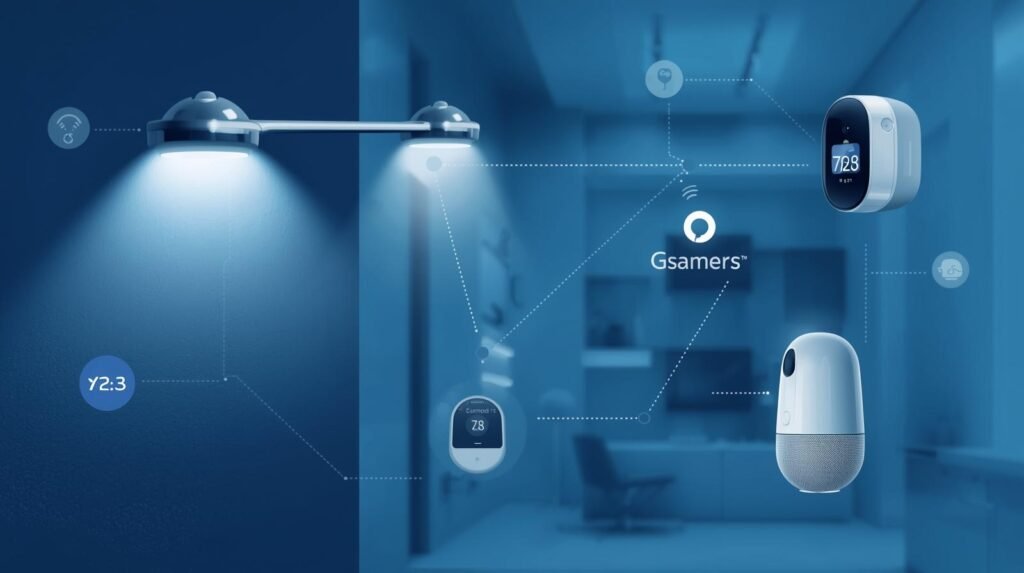
Smart home devices have evolved from simple “gadgets” into small computers that provide real-time information about what’s happening in your home and share it with other products, allowing them to react to these updates. This is at the core of IoT (Internet of Things); everyday objects exchange data to enable useful, automated processes.
Smart home devices can be connected to one another in several different ways. Most devices use either Wi-Fi to connect directly to your router, or Bluetooth, Zigbee, or Thread to connect to a local hub. Many homes have a single device, such as a smart speaker or a central hub, that acts as a translator, enabling all smart home devices to communicate with each other regardless of their wireless standard.
Once connected, most smart home devices send short reports/notifications (e.g., door or window opening/closing, motion detected, temperature changes) rather than continuously sending large amounts of data.
The simplest example would be a “scene.” A smart home device will let you link a door sensor to a hallway light so that when the door is opened after sunset, the hallway light turns on automatically. Another common combination is a thermostat linked to a window sensor, which will pause heating when a window is left open. The process of linking two smart home devices is typically handled through an app/cloud service; newer IoT systems can now make decisions based on locally collected data, reducing response times.
Smart home devices can connect to you and to other devices. A notification, log, or health check is sent from smart home devices to your mobile device so you can view all events and adjust your settings.
Over time, smart home devices will learn your habits, such as when you typically come home, and can recommend an automation for you.
However, because smart home devices control your physical space and are connected to the internet, security is important. To protect your smart home devices, keep their firmware up to date, use strong passwords, and, if possible, connect them to a guest or IoT network. When configured properly, smart home devices can communicate seamlessly and work together to make your home more comfortable, efficient, and safe – all through one IoT message.
#Breakthrough Guide to Genomic Data and Why AI Needs It
IoT Device Connectivity: The Backbone of Smart Communication

Smart communication in today’s connected world relies heavily on the successful exchange of information through IoT – from one device to another, one app to another, and across various platforms.
This is where IoT Device Connectivity comes into play; it establishes how sensors transmit data to devices, devices receive instructions from other devices and applications, and how systems continue to respond. The optimal IoT Device Connectivity solution must balance speed, range, power consumption, and cost to provide reliable communication without draining battery life or losing messages.
IoT device connectivity can be achieved through multiple methods. In home and office environments, Wi-Fi is popular for its high speeds and widespread availability. Bluetooth is also used when rapid pairing and control are required over short distances. Low-Power Wide Area Network (LPWAN) technologies such as Zigbee and Thread are designed to operate in environments that require connectivity among many small devices with lower power requirements.
These networks typically employ a hub or border router to manage network traffic. Cellular (4G/5G, LTE-M, NB-IoT) and LPWAN (LoRaWAN) technologies are commonly used in wide-area IoT solutions, where speed is sacrificed for greater range and longer battery life. In industrial environments, Ethernet and private cellular networks offer reliable, low-latency communication. The type of IoT Device Connectivity solution chosen will depend on the specific environment (location), interference levels, mobility, and data transmission frequency.
Strong IoT device connectivity includes what happens after a signal has been sent. Protocols translation and data filtering at edge gateways reduce cloud load and improve response times. Managing devices to provision, monitor, and deliver remote updates is important for keeping large numbers of IoT devices in good working order as they grow and evolve within an IoT system.
Protecting IoT data from unauthorised access and ensuring that unauthorised parties cannot gain control over an IoT device’s connectivity is just as important as providing reliable connectivity. In this way, IoT systems will be able to communicate effectively between devices, provide you with the insights you need, and perform the automated functions you expect – making IoT communications feel like a normal part of your daily routine.
Communication Between IoT Devices: From Sensors to Systems

Communication between IoT devices – whether sensors or systems – is based on a straightforward concept: small sensors gather data and pass it to other parts so they can take action. The advantage of IoT applications lies in how quickly and reliably IoT devices communicate, enabling them to translate raw data into actionable decisions.
Sensors are designed to measure temperature, motion, vibration, position, and/or power usage. A sensor sends a brief message to a gateway, hub, or nearby device using Communication between IoT devices.
There are several protocols for transmitting this message, depending on distance and power requirements (e.g., Wi-Fi, Bluetooth, Zigbee, Thread, Cellular). In most IoT applications, a gateway collects multiple messages and transmits them to cloud-based services for storage, dashboard creation, and analytics – another significant form of communication between IoT devices.
Modern IoT devices can now communicate with one another via various methods, including publish/subscribe models, to enable sensing and action (e.g., a thermostat can adjust the room’s heating based on updates from a room sensor). Edge computing has become very popular within modern IoT device designs due to its ability to make decisions locally on the IoT device, versus sending all of the data to the cloud for processing.
This decision-making method reduces latency in communication between IoT devices and enables the system to continue operating during periods without internet connectivity. The complexity of coordinating a large number of IoT devices requires that they be uniquely identifiable, use a common timestamp, and exchange data in a standardised format. These requirements help ensure consistent communication between IoT devices, regardless of brand or platform.
In addition to these requirements, security will be a major factor in the successful deployment of large-scale IoT networks. Data encryption, device authentication, and network access restrictions will all help prevent unauthorised access to sensitive information and ensure the integrity of data communicated between IoT devices. Once properly designed, communication between IoT devices can support large-scale deployments ranging from a single sensor to an entire building or even a city, while providing a safe, intelligent, and effective means of operating those systems.
#Empowering Smart Wearables and AI: How They Track Your Health
IoT Network Protocols: Rules That Devices Follow to Talk
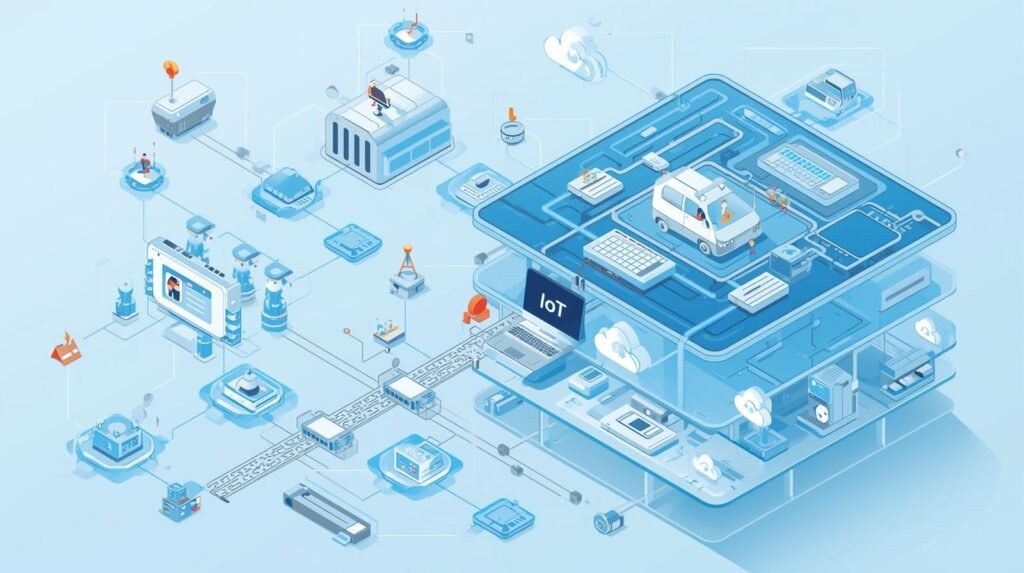
IoT Network Protocols – The “Rules of the Road” Between Connected Systems. IoT network protocols (the shared languages and traffic patterns) enable the various parts of a connected system to function effectively together. IoT devices do not simply transmit arbitrary data; they communicate using established IoT network protocols that ensure messages are delivered in the correct format, at the correct time, and to the correct destination.
If there were no IoT network protocols, an IoT sensor, gateway, and application would not have been able to communicate with each other.
For connecting devices at the network layer, examples of IoT network protocols include Wi-Fi, Bluetooth, Zigbee, Thread, and cellular technologies. These different IoT network protocols serve different needs in IoT implementations. Wi-Fi is faster than many other options and is widely used in home environments, while Bluetooth is ideal for short-range device pairing.
ZigBee and Thread are also suitable for low-power mesh networks, in which devices can act as message repeaters. Cellular-based IoT solutions, such as LTE-M and NB-IoT, provide longer-distance communication. The choice of IoT network protocol is based on requirements for battery life, communication range, environmental interference, and data volume.
Several IoT network protocols that operate above the connection layer address messaging. MQTT has become a popular protocol due to its low overhead and publish/subscribe capabilities, making it a good option for large numbers of IoT devices sharing status information. CoAP was designed to provide an alternative to other constrained-device protocols (such as MQTT) and supports many of the same use cases as MQTT through simple request/response interactions.
HTTP/HTTPS are also used in IoT networks, particularly when devices require more energy than a typical battery can provide or when there is a desire for some level of web compatibility. In practice, many systems use multiple IoT network protocols: one for the radio link and another for packaging and delivering data.
In addition to selecting appropriate IoT network protocols, it’s important to consider reliability and security. Reliability features of IoT network protocols include quality of service settings, acknowledgements, and retries that help them handle poor signal strength.
Security features such as encryption and authentication will prevent both eavesdropping and impersonation on IoT networks, which is becoming increasingly important as IoT moves into homes, healthcare, and industrial environments. By selecting the correct IoT network protocols, IoT communications can be predictable, scalable, and reliable.
IoT Data Exchange: How Information Moves Securely

The process of converting raw sensor readings into actionable information (IoT Data Exchange: How Information Moves Securely) occurs when a sensor reading is shared by an IoT device and then translated into meaningful data.
As devices in IoT continuously send out very small amounts of data (motion detection, temperature readings, energy usage, etc.), this exchange is both necessary for reliable communication and security in order to ensure that the correct data is received at the correct destination and also to prevent unauthorized individuals from viewing the data sent, modifying it, etc.
Typically, the data begins on the device itself. The sensor takes a measurement, creates a package around the measurement (in the form of a message), and sends it via Wi-Fi, Bluetooth, Zigbee, Thread, or Cellular network.
Typically, after that point, the data passes through a gateway or hub that receives all incoming signals, filters out unwanted or irrelevant noise, and forwards only the relevant data. In most cases, the data is stored in a cloud platform, where it is analysed and automated responses are initiated based on that analysis. This is another vital component of the IoT data exchange, connecting the physical world to the digital world via dashboards and applications.
IoT Data Exchange is necessary to protect user privacy. If an attacker intercepts your IoT data exchange, then he/she may see your private activities or take control of a device connected to the network. Secure IoT Data Exchange uses encryption during transmission (e.g., Transport Layer Security (TLS)) to prevent attackers from intercepting messages. All devices should be able to verify each other’s identities through certificates, keys, or secure tokens.
This will prevent an attacker from impersonating another device and potentially gaining access to all the devices within the IoT Network. Access controls can be implemented to restrict who can view IoT data exchanges or send commands. Secure updates provide patches for security flaws that could affect the safety of the data exchange process for IoT over a long period of time.
IoT Data Exchange also requires sound design to ensure integrity and reliability. The use of checksums, message acknowledgement, and retry rules will improve the reliability of data exchange. The use of timestamps and standardised formats will also enable the easy integration of IoT Data Exchange from multiple sources.
There are also modern technologies that implement edge processing, enabling the IoT Device to make immediate, local decisions when the internet connection fails and to sync the information with the rest of the IoT Data Exchange once the connection is restored. If strong encryption, strong authentication/identification, and real-time monitoring are built into the initial design, IoT Data Exchange will remain fast, reliable, and secure—enabling trusted IoT automation.
Wi-Fi vs. Bluetooth: Choosing Between the Superhighway and the Side Street
Wi-Fi and Bluetooth, two of the most popular ways your smart devices connect, each offer a different way to connect (similar to freeways and local streets). Wi-Fi can be thought of as the freeway/highway, while Bluetooth is the local street. The highway is designed for high-speed, long-distance travel; it is best suited for devices that transmit large amounts of data, such as a smart TV streaming 4 K video or a video doorbell transmitting real-time images from a doorbell to a smartphone.
Because Wi-Fi transmits large amounts of data to achieve the speeds needed to support many applications, it is generally used by devices connected to an electrical outlet rather than by battery-powered devices. A local street/Bluetooth is designed for short-distance travel with minimal fuel use. Bluetooth is well-suited for battery-powered devices, such as wireless headphones or smart key fobs, that only need to transmit small amounts of data and can run for years on minimal battery life.
This core distinction will help explain some of the frustration and provide guidance on making better decisions about installing an important device, such as a security camera. Before installing a critical device such as a security camera, go to the location where you plan to place it and check the number of Wi-Fi bars your phone shows. If there are few or no bars on your phone (indicating poor coverage), your security camera will likely have the same issue. Even though Wi-Fi is a strong technology, placing too many devices on a single Wi-Fi network creates another problem: excessive digital traffic, which can slow them all down.

The “Crowded Room” Problem: Why Your Wi-Fi Chokes on Too Many Smart Devices
Your home Wi-Fi highway is fast, but it also has traffic jams. Your Wi-Fi router is like someone trying to have multiple conversations at once in a crowded room. In addition to your laptop, other devices (smart plugs, etc.) will also be competing for the router’s attention. While a smart bulb uses little data, it still periodically checks in, causing constant background noise. The more devices you connect to your network, the harder it is for your router to communicate with them simultaneously, which is when most common smart home frustrations occur.
You probably have felt the effects of the digital traffic jam. That’s why your security camera may continuously buffer, your smart speaker may take several seconds to respond to a command, or a device may simply stop showing as “online” with no apparent cause. The fact that your internet is slow or that the device is broken is unlikely to be the cause of these issues. Rather, it is one of the major challenges of today’s connectivity. Most home routers will begin to experience performance issues after you connect over 25-30 devices to your router – a number easily reached by many homes today.
Before adding yet another WiFi-only gadget to your home, perform a quick mental count of how many things are currently connected in your house. Include all phones, tablets, computers, TVs, game consoles, and smart devices. If your current network already has many users, you are likely to experience further slowdowns. What can you do if you’ve run out of space on your local WiFi network? Fortunately, there is a better way to handle all that traffic.
#How IoT Works in Hospitals: IoMT is Revolutionary & Lifesaving
What Is a Smart Hub? Your Smart Home’s Personal Air Traffic Controller
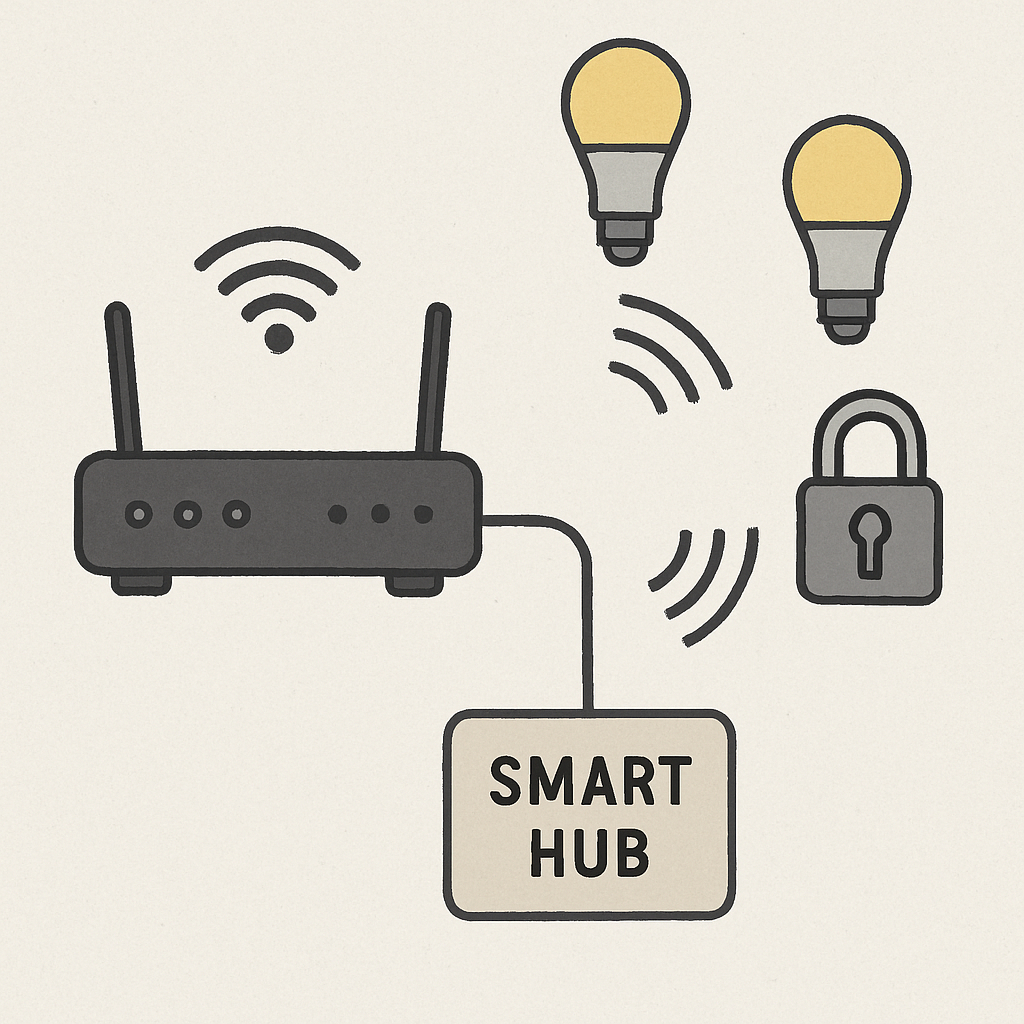
Instead of each of your devices screaming for the router’s attention, you can direct traffic through a dedicated Smart Hub (also called a Gateway), which you can think of as the Air Traffic Controller for your Smart Devices. The Hub connects to your main Wi-Fi router and creates a separate, private network for all your compatible lights, sensors, and other devices. Almost instantly, your main Wi-Fi network is now available to applications that need bandwidth (Video Calls, Streaming Movies, etc.), and your Smart Home has a separate, private path through the Hub.
The second critical role of the Hub is to act as a Universal Translator; many Smart Devices cannot communicate directly over Wi-Fi. In fact, many devices are built to use Low-Power Wireless Protocols such as Zigbee or ZWave to conserve Battery Life and limit Network Congestion.
The Smart Lock may use Zigbee to communicate with the Hub, and the Hub will translate that command into a language the Wi-Fi Router can understand. That is why some Products (Philips Hue Lighting System), will require a Hub to operate; their Bulbs do not speak the Native Language of your Home Wi-Fi.
This brings us to the Larger Question at hand: Do I really need one? If you plan to have only a few Smart Plugs, you should be able to get by without a Hub. On the other hand, if you are planning to set up a Home with 15-20+ devices (especially Small Sensors and Lights), a Hub-Based system will provide far greater Reliability than a Wi-Fi-only system.
A Hub-Based system will also help prevent your Main Network from overheating due to increased load from connected devices, which is an important aspect of building a Reliable System. But what makes a Device want to use a Special Language, such as Zigbee, in the first place? There are several Advantages that make these languages well-suited for a Truly Smart Home.
Zigbee and Z-Wave: The Secret, Low-Power Languages of Smart Devices
Zigbee and Z-Wave’s extraordinary low power consumption — which means each device uses less power — has an enormous practical benefit: the ability to run these devices on batteries for multiple years, rather than mere days. For example, a very small door or temperature sensor with a small coin battery (and nothing else) will continue to run for well over two years before needing replacement. This is one of the biggest trade-offs when comparing Zigbee/Z-Wave to Wi-Fi.
- Wi-Fi: High Power, High Speed, Directly connects to your router.
- Zigbee/Z-Wave: Low Power, Slower Speed, Connects to a Smart Hub.
There is an easy-to-remember “rule of thumb” for building your smart home. If you’re purchasing battery-operated devices such as motion sensors, water leak detectors, or smart buttons, look for Zigbee- or Z-Wave-compatible models. You’ll have a “set it and forget it” experience; you won’t have to worry about replacing dead batteries frequently.
Although Zigbee and Z-Wave are fundamentally different technologies, most people considering Zigbee vs Z-Wave for a smart home will find that both offer similar benefits. However, their low-power design also enables the devices to communicate with one another, creating a stronger smart home system overall.
The “Bucket Brigade” Power-Up: How Mesh Networks Make Your Smart Home Stronger
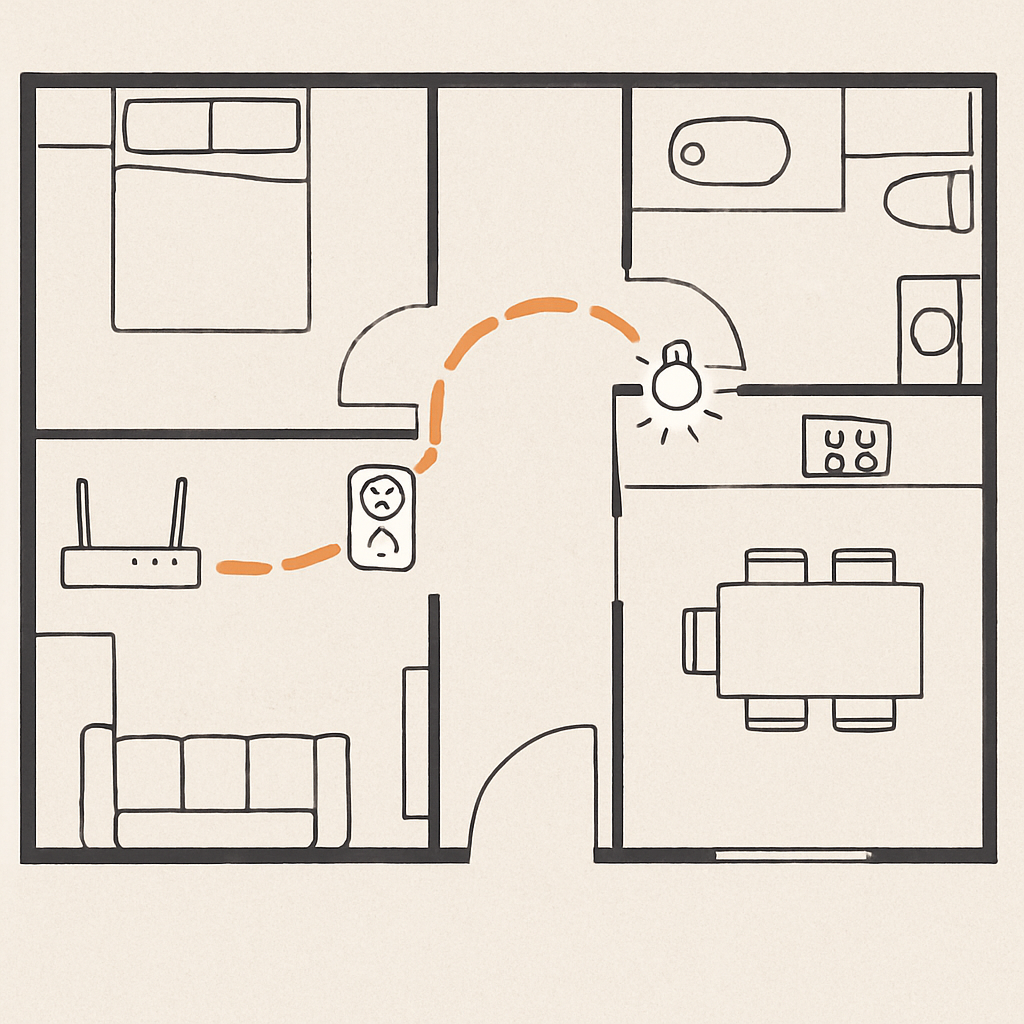
The significant energy-saving capabilities of Zigbee and Z-Wave are only half the story. The true superpower of Zigbee and Z-Wave lies in their ability to collaborate. Think about your smart hub in the living room, wanting to control a smart lock on your front door, which is just beyond the hub’s reach. Rather than failing, they can relay the command from one to the other, as in a group passing buckets of water to fight a fire. This collaborative network, called a mesh network, is one of the greatest advantages of using low-power languages to create smart devices.
The cleverness lies in how it operates. All Zigbee or Z-Wave devices plugged into the wall (e.g., smart plugs, light bulbs) will function as signal repeaters. They listen for commands and then forward those commands to the next device in the “chain”. Therefore, with each powered device you install, your network does not become more congested; it becomes stronger and reaches further. A mesh network for smart devices is an effective way to address connectivity issues in smart homes and turn potential dead zones into areas with strong, reliable coverage.
Therefore, mesh networking provides an ideal solution to smart home “dead zones.” If a battery-powered sensor in your basement is having trouble connecting to the network, you do not need to relocate the hub. By installing a relatively inexpensive smart plug between the two locations, you can create a “bridge” to relay the signal and revive the sensor. As noted above, the self-reinforcing nature of a mesh network is a key consideration when choosing between Zigbee and Z-Wave for a smart home. Now that your devices are connected, the next question is: where is the “brain” that controls your devices, inside your home or on the Internet?