











Executive Briefing
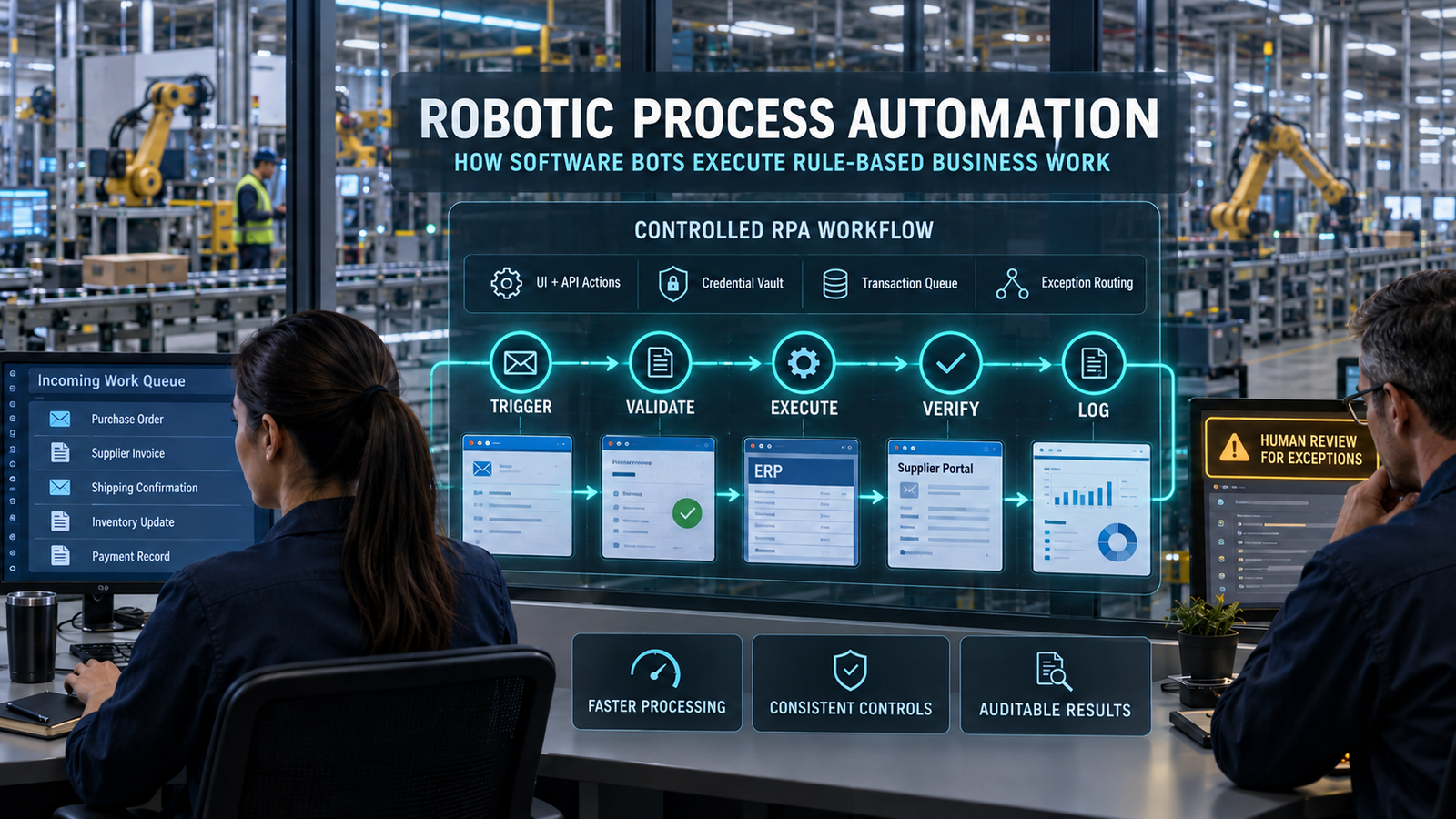
Robotic process automation uses software workers to carry out repeatable tasks across business applications. A bot might retrieve an invoice, check its fields, enter an approved transaction into an ERP system and record the confirmation. Production reliability comes from the controls surrounding those actions: identities, queues, verification, exception handling and accountable ownership.
The strongest candidates have clear rules and predictable inputs. Meaningful transaction volume helps, but stability matters just as much. Automating an unresolved policy disagreement or a frequently redesigned process usually creates a faster route to operational trouble.
A successful demonstration is not a production business case. The system must survive application changes, handle partial transactions, preserve segregation of duties and recover without duplicating payments, orders or records.
Measure accepted outcomes and complete costs. Released employee time, cash savings and risk reduction are different benefits. Licenses, infrastructure, exception review and ongoing maintenance belong in the same financial assessment.
The operating rule: a bot has completed its work only when the intended business result is verified—not when its last click succeeds.
Where Automation Fits in the Business Process
The problem is often the handoff between applications. An accounts-payable analyst may download an attachment, inspect a purchase order, check supplier details, enter values into an ERP screen and notify an approver. Each application works, yet the transaction still depends on manual transfer.
RPA software can bridge that gap without replacing the underlying systems. This can be useful when an application lacks a suitable integration interface or core modernization will take years. The bridge still needs an owner, a maintenance budget and an eventual review of whether it remains necessary.
Distinguish RPA, Workflow and AI
These technologies solve related but different problems. An enterprise automation platform may combine all three, but their responsibilities should remain clear.
| Approach | Primary responsibility | Example | Main design concern |
| RPA | Execute repeatable application interactions | Enter an approved order into a legacy portal | Interface changes, execution state and verification |
| Business process automation | Coordinate an end-to-end process | Route an invoice through validation, approval and posting | Ownership, handoffs, rules and process state |
| API integration | Exchange data or invoke supported application functions | Create an ERP transaction through a documented endpoint | Authentication, contracts, limits and transaction semantics |
| AI-assisted automation | Interpret uncertain or unstructured inputs | Extract invoice fields or classify correspondence | Error measurement, uncertainty and validation |
| Human review | Resolve ambiguity or exercise authorized judgment | Approve an unusual payment or investigate a mismatch | Evidence, workload, authority and response time |
Deterministic automation is not necessarily artificial intelligence. A workflow following explicitly programmed rules differs from a model that estimates a document category or generates text. Adding AI changes the evidence needed before an output can safely drive an action.
Select Work That Can Be Defined and Verified
Good candidates have a clear beginning, an accepted result and an accountable owner. Stable rules, digital inputs, repeatable volume and manageable exceptions make implementation easier. High-consequence processes also require stronger approval and reconciliation controls.
| Candidate characteristic | Favorable signal | Reason to pause |
| Rules | Documented and consistently applied | Different teams interpret the policy differently |
| Inputs | Structured or reliably extractable | Missing fields, poor scans or inconsistent documents |
| Applications | Stable interfaces and supported access | Frequent redesign or unreliable remote sessions |
| Volume | Enough work to justify lifecycle costs | Small workload with little control or service benefit |
| Exceptions | Recognizable categories and named reviewers | Most cases require individual judgment |
| Verification | Target-system confirmation is available | Completion can only be guessed from screen behavior |
| Ownership | Business and technical owners accept responsibility | The project depends on one developer or contractor |
Volume is not the only source of value. A lower-volume process may justify automation because it improves evidence, deadline compliance or control consistency. State that business case explicitly rather than forcing it into a headcount-reduction argument.
Recognize the Cost of Doing Nothing—and Moving Too Soon
Manual work carries more than handling cost. Re-keying, aging queues and private spreadsheets can create rework, weak audit trails and dependence on undocumented employee knowledge. Delays may also affect customer service, working capital or contractual deadlines.
Premature automation can multiply defects. A bot that applies the wrong supplier rule consistently is still wrong. Repair disputed rules, unreliable master data and unclear approvals before encoding them into production.
Research supports attention to organizational readiness. Nielsen and colleagues’ 2023 IEEE Access paper identifies a clear, well-defined and stable process as a central benefits-realization factor. Its abstract cites a 30%–50% initiative-failure range as background; that range should not be presented as a newly measured, universal failure probability for prospective buyers. Aalborg University’s Research Portal
How Robotic Process Automation Works in Production
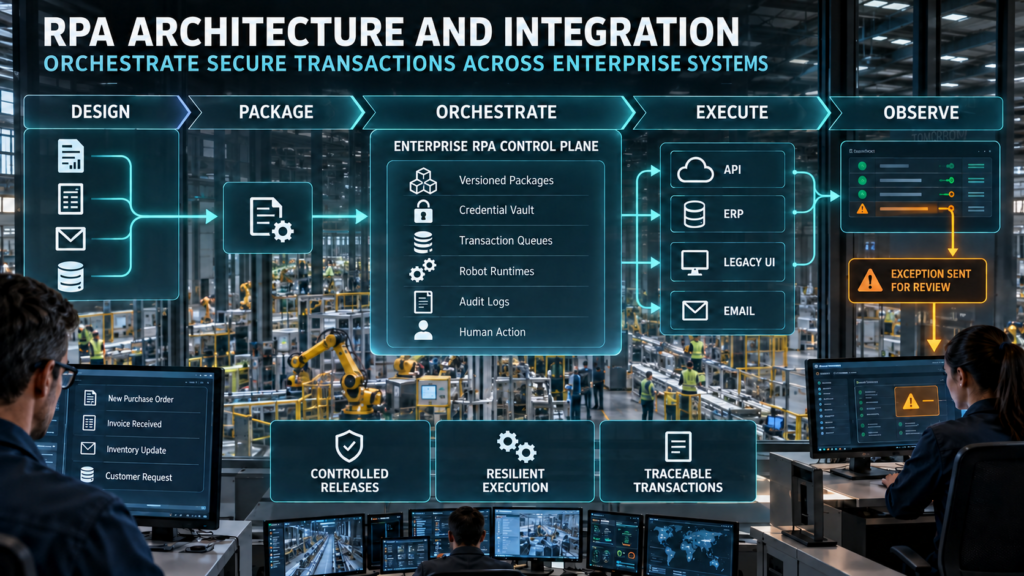
The visible bot is one component in a managed execution system. The surrounding architecture determines which package runs, which identity it uses, which transaction it owns and what evidence remains afterward.
| Component | Responsibility | Operational question |
| Design environment | Define workflows, selectors, API calls, rules and tests | Can another engineer understand and maintain the implementation? |
| Package repository | Preserve approved versions and dependencies | Can operators identify exactly what ran? |
| Orchestrator | Schedule jobs, allocate capacity and manage execution | Who can start, stop or change a production job? |
| Robot runtime | Execute approved actions on a desktop or managed machine | Is the session supported, isolated and recoverable? |
| Credential service | Provide controlled access to secrets | Can credentials rotate without being embedded in code? |
| Queue and state store | Track transaction ownership and progress | Can interrupted work resume without duplicate effects? |
| Observability | Record status, alerts and diagnostic evidence | Can staff investigate without exposing sensitive data? |
| Human-action channel | Route exceptions and approvals | Does the right person receive enough context to act? |
Attended and Unattended Execution
Attended automation assists someone working in an active session. It can retrieve information, populate fields or guide a bounded desktop task while the employee retains responsibility for the interaction. Desktop compatibility and permitted user-triggered actions need testing.
Unattended automation runs without continuous user involvement. Typical examples include scheduled reconciliations, overnight reports and queue-based back-office processing. It requires supported authentication, runtime capacity, monitoring and response coverage.
The licensing distinction also affects architecture. A subscription that enables an employee to run an attended flow does not automatically provide unattended capacity. Confirm development, execution, application and infrastructure entitlements separately.
Prefer Supported Interfaces Over Fragile Screen Interactions
Use a supported API when it satisfies the process and control requirements. APIs generally provide clearer input and response contracts than screen scraping, although they still require authentication, error handling and version management.
UI automation remains useful for systems without suitable interfaces. Accessibility selectors are generally preferable to fixed coordinates, while visual recognition can help in environments where application elements are unavailable. Browser versions, display scaling, focus and remote-session behavior remain dependencies.
Direct database access needs particular care. Use an application-owner-approved interface or procedure that preserves business validation and supportability. Writing directly to application tables can bypass controls even when the SQL operation itself succeeds.
| Integration method | Potential benefit | Main caution |
| Supported API or connector | Explicit functions and structured responses | Check permissions, limits, versioning and duplicate handling |
| Controlled file exchange | Suitable for batch interfaces | Validate schema, completeness, delivery and acknowledgment |
| Application-approved database interface | Can support specific authorized integrations | Preserve application rules and vendor support |
| Accessibility-based UI automation | Works through identifiable interface elements | Selectors and application behavior can change |
| Visual recognition | Useful for some remote or image-based interfaces | Rendering, latency and recognition errors affect execution |
| Coordinate-based interaction | Quick for tightly controlled tasks | Highly sensitive to layout, focus and display changes |
Follow a Verified Transaction Flow
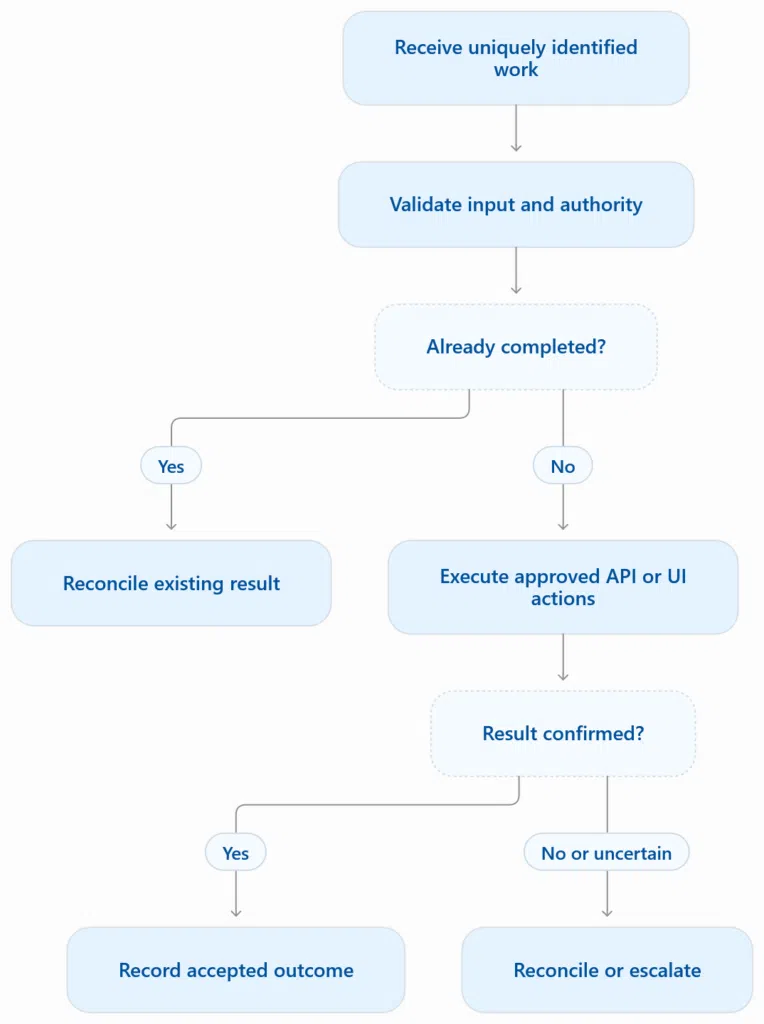
Verification belongs in the target system. A confirmation number, committed status or system-of-record query provides stronger evidence than a completed click sequence. Check that the result contains the intended values, not merely that a record exists.
Multi-application work rarely has one shared rollback mechanism. If a workflow creates an order in one system and fails while updating another, it needs a documented recovery or compensating action. Rolling back the automation package does not reverse business transactions already committed.
Prevent Duplicate Effects After a Timeout
A timeout leaves an important question unanswered: did the target application commit? Repeating the action immediately can create a second payment, claim or order. Check the transaction state before replaying any action with business consequences.
Use idempotency mechanisms where supported. A stable business key and target-side uniqueness control are stronger than a simple “search before insert” check. Two concurrent workers can both find no existing record and then create duplicates unless transaction ownership or uniqueness is enforced.
Never treat an uncertain outcome as a confirmed failure. Reconcile the target state before retrying an irreversible or financially consequential action.
Separate Business Exceptions From Technical Incidents
Queues make work independently trackable. Each item should have a business identifier, input reference, owner or lease, status, priority and retry history. Store sensitive documents in controlled repositories rather than copying unrestricted content into queue payloads.
| Outcome | Example | Appropriate response |
| Business exception | Missing purchase order or invalid policy number | Route to the process owner; correct the input or resolve the rule |
| Transient technical failure | Temporary network interruption or rate limit | Retry within limits, using backoff and duplicate protection |
| Persistent technical failure | Expired permission or broken selector | Stop repeated attempts and escalate to operations |
| Uncertain committed state | Timeout after submitting a payment | Reconcile before further execution |
| Control violation | Attempt exceeds payment limit or approval authority | Block the action and follow the incident procedure |
Not every technical error is retryable. A rejected credential or changed field locator will rarely recover through repeated execution. Retry limits, backoff and circuit breakers prevent one dependency failure from becoming a queue-wide incident.
Adding Document Processing and Generative AI
AI expands the input range while introducing uncertainty. OCR and extraction models can convert documents into structured fields, but a plausible value is not necessarily a correct value. A decimal error or incorrect bank detail can outweigh thousands of correctly extracted fields.
Validate Fields According to Consequence
Use business checks alongside model outputs. Supplier identity, purchase-order references, invoice totals, currency and tax calculations provide independent validation opportunities. Bank-account changes should follow the organization’s separately approved verification process.
Confidence scores are not guarantees. A threshold should be evaluated on representative documents and relevant fields, with its review workload measured. A high aggregate score can conceal poor performance on a rare but expensive transaction type.
Preserve provenance. Retain the source reference, extraction or model version, validation results, reviewer changes and final posting evidence according to retention policy. This supports both investigation and controlled improvement.
Keep Language Interpretation Separate From Authority
An email or attachment can contain instructions aimed at an AI component. A message might attempt to redirect a model, expose data or trigger a connected tool. This is a prompt-injection concern for language-model integrations, not an inherent property of every deterministic bot.
Enforce permissions outside the model. Restrict tools and destinations, validate structured outputs and require the appropriate approvals before consequential actions. Retrieved text should not redefine payment policy or expand the robot’s permissions.
Protect training examples and feedback records. Incorrect or maliciously altered labels can contaminate future extraction or classification behavior. Review datasets, record their provenance and avoid automatically treating every operator correction as trusted training material.
Test the Entire AI Pipeline
Model testing must extend beyond a demonstration document. Google’s ML documentation describes deployment checks across data, features, model versions, serving infrastructure and pipeline integration. Apply that discipline to the AI component before its output reaches the execution workflow. developers.google.com
Use representative holdout documents. Include difficult scans, layout changes, unusual currencies, missing fields and misleading content. Keep evaluation material separate from training and tuning, and report results by document and transaction type.
Where Bots Break—and How to Contain the Damage
Most production failures occur at dependencies and boundaries. Interface behavior, identity services, source data and application releases deserve the same engineering attention as workflow logic.
| Failure mode | Operational effect | Practical control |
| Interface drift | Selectors or navigation stop working | Dependency inventory, regression tests and release coordination |
| Remote-session changes | Visual actions fail or select the wrong element | Supported session configuration and explicit state checks |
| Credential or permission changes | Jobs fail or gain inappropriate access | Managed identities where supported, vaulting and access reviews |
| Bad input | Incorrect transactions execute quickly | Validation before posting and business exception routing |
| Concurrent workers | Duplicate or conflicting updates | Queue ownership, locking and target-side uniqueness |
| Rate limits | Backlogs and repeated requests | Capacity planning, backoff and bounded concurrency |
| Partial completion | Systems disagree about transaction status | Checkpoints, reconciliation and approved compensation |
| Excessive evidence capture | Screenshots or logs expose confidential information | Data minimization, masking and retention controls |
| Unowned components | Fixes become slow and inconsistent | Named maintainers, versioning and supported handover |
Build Reuse Without Creating Hidden Dependencies
Reusable login, logging and exception components can reduce duplicated work. Each component still needs an owner, a tested version and a clear dependency relationship. Updating a shared component without regression testing can spread a defect across many processes.
Research illustrates the opportunity, not a guaranteed saving. Průcha and Madzík’s SiDiTeR study reported 655 similarity matches across 156 processes. That finding supports examining duplication, but it does not establish an automatic maintenance-cost reduction for another organization. arxiv.org
Prepare People for the Exceptions Left Behind
Automation can remove routine practice while leaving difficult cases with employees. Bainbridge’s Ironies of Automation describes how automation can increase rather than eliminate human-operator challenges. Reviewers need usable evidence, training and periodic recovery exercises. ScienceDirect.com
A manual fallback needs capacity as well as instructions. A documented procedure is insufficient if no trained employees are available before payroll, payment or reporting deadlines. Test how much interrupted work the fallback can absorb.
Evaluating Robotic Process Automation Before Scaling
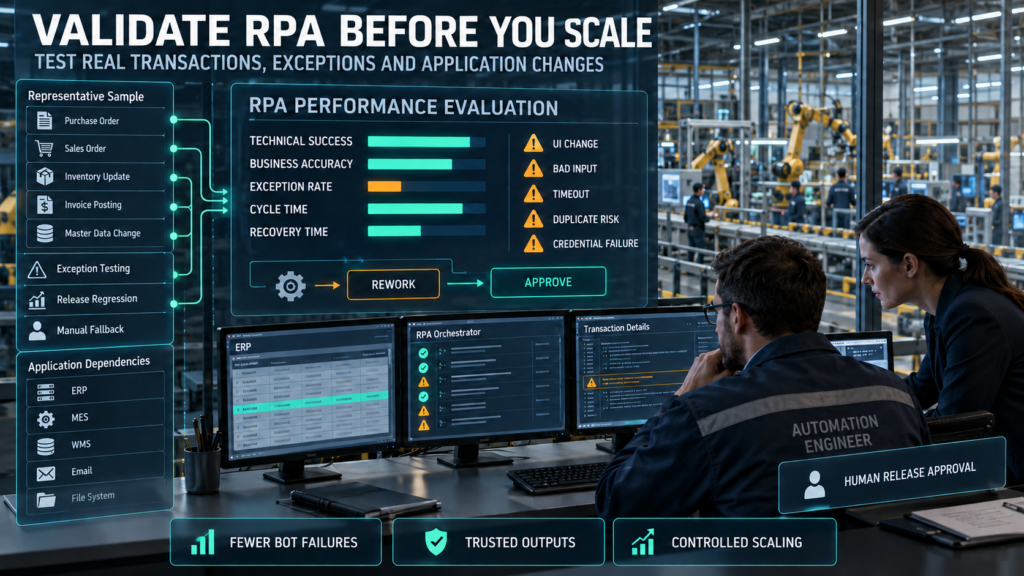
Define accepted outcomes before development begins. Count business transactions separately from execution attempts, and distinguish technical completion from correct business results.
| Measure | Reporting basis | What it reveals |
| Straight-through rate | Correctly completed eligible transactions without human intervention ÷ eligible transactions attempted | Actual automation coverage |
| Technical success rate | Unique transactions reaching a verified technical outcome ÷ unique transactions attempted | Integration and platform stability |
| Business exception rate | Rule-invalid transactions ÷ transactions attempted | Input and policy problems |
| Rework rate | Completed outputs requiring correction ÷ completed outputs assessed | Business-result quality |
| Retry frequency | Additional attempts per unique transaction | Instability and hidden consumption |
| Cycle time | Valid intake to accepted completion | Service performance; report median and tail percentiles |
| Queue age | Elapsed time for outstanding work | Deadline and backlog exposure |
| Cost per accepted item | Full operating cost ÷ accepted completed transactions | Unit economics |
| Recovery time | Incident detection to restored service | Operational resilience |
| Control effectiveness | Passed control tests, reported by severity and coverage | Whether safeguards work as intended |
Declare denominator rules in advance. If invalid inputs are excluded from the eligible population, report their number and outcome separately. Otherwise, straight-through performance can improve on paper while employees inherit an expanding exception queue.
Averages can hide a failing subprocess. Segment results by application version, business unit, document type and exception class. Track severe errors separately so a large volume of easy transactions does not obscure consequential failures.
Test Failure Paths Deliberately
A representative pilot must include more than normal work. Test an application outage, credential rotation, duplicate delivery, malformed input, interface change and timeout after submission. Verify both the automated response and the operator’s recovery procedure.
Keep the evaluation configuration traceable. Changes to rules, selectors, models and thresholds should create identifiable versions. Separate tuning results from subsequent acceptance evidence.
Research offers assessment methods rather than universal suitability claims. Wewerka and Reichert’s review analyzed 63 publications and developed an assessment framework. Its practical lesson is to examine fit systematically rather than assume every repetitive task belongs in an RPA portfolio. arxiv.org
Compare Platforms Through the Same Workload
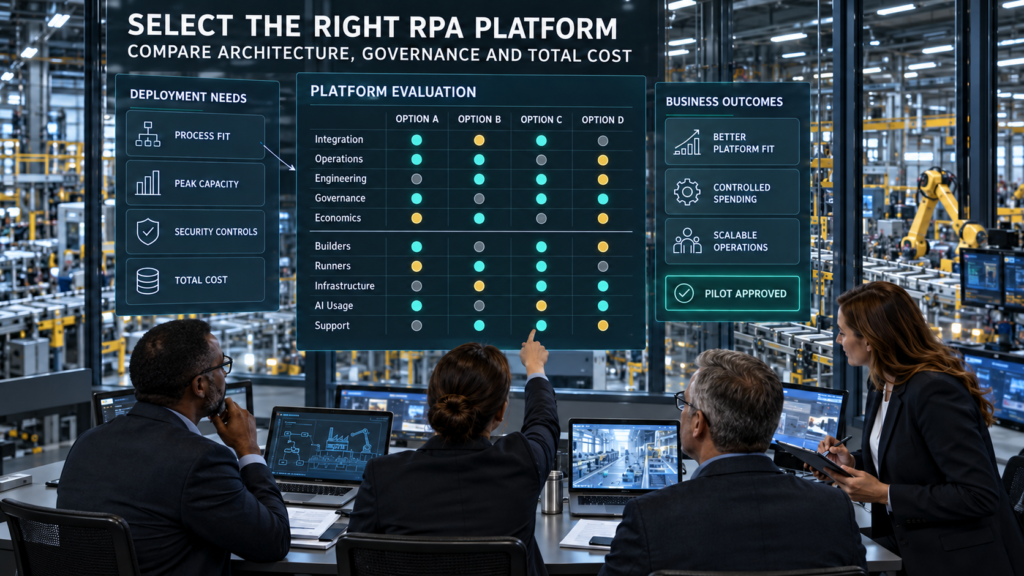
Public entry prices are not equivalent production quotations. Compare the same transaction mix, peak concurrency, controls, environments and support requirements across shortlisted products.
| Platform | Potential fit | Public commercial signal | What the complete estimate must include |
| Microsoft Power Automate | Microsoft-oriented environments combining flows, connectors and desktop automation | US page lists Premium at $15/user/month, Process at $150/bot/month and Hosted Process at $215/bot/month, paid yearly | Required users, execution capacity, connectors, application rights, storage, AI and support |
| UiPath | Cross-application programs requiring orchestration, document processing and enterprise controls | Basic starts at $25/month; Standard and Enterprise direct buyers to sales | Exact tier, robots, consumption, deployment, governance features and infrastructure |
| Automation Anywhere | Programs combining RPA, document processing and broader automation | Obtain a scope-specific commercial proposal | Builders, runners, environments, AI/document consumption, storage and support |
| SS&C Blue Prism | Centrally governed automation and orchestration programs | Obtain a scope-specific commercial proposal | Runtime capacity, hosting, development, recovery, services and support |
Microsoft and UiPath prices above reflect their public pages checked for this article on 27 October 2026. Automation Anywhere and SS&C Blue Prism publish broader product portfolios whose proposed scope should be confirmed contractually. These rows are not equivalent bundles or a performance ranking. Microsoft Power Platform
Model Concurrency Before Buying Capacity
One bot entitlement does not imply unlimited parallel execution. Microsoft documents that a Process license allocated to a machine becomes an unattended bot that runs one desktop flow at a time. Licensing and technical session requirements must both support the planned workload. Microsoft Learn
Size for the deadline window. A process averaging a few hundred daily transactions may still need substantial capacity if most work arrives shortly before a cutoff. Include startup time, retries, application limits, outages and contingency headroom.
Verify Controls in the Quoted Edition
Do not infer enterprise entitlements from the product name. UiPath’s plan comparison places features such as customer-managed credential vaults and CI/CD options within specified tiers. Confirm the exact edition, deployment model and contractual terms. UiPath
Score five buying dimensions. Integration, operations, engineering, governance and economics should all have acceptance criteria. A platform can be technically capable yet unsuitable for the team expected to administer it.
Procurement requirement: request a complete bill of materials covering builders, runners, orchestration, environments, AI consumption, infrastructure, support and implementation—not a single headline license price.
Robotic Process Automation Costs, ROI and Payback
License cost is only the visible starting point. Discovery, process repair, testing, support and application-change maintenance determine whether the investment remains economical.
| Cost category | Include |
| Discovery and redesign | Process mapping, baseline measurement, policy clarification and data cleanup |
| Development | Workflow engineering, connectors, reusable components and documentation |
| Testing | Representative data, exception tests, regression and recovery exercises |
| Platform | Builders, runners, orchestration, storage and optional modules |
| Infrastructure | Machines, operating systems, networking, environments and recovery capacity |
| AI services | OCR, extraction, inference, retries, evaluation and review labor |
| Operations | Monitoring, scheduling, credential administration and incident response |
| Change maintenance | Application updates, shared-component changes and release testing |
| Governance and exit | Access reviews, evidence retention, supplier management and transition support |
Separate Cash Savings From Capacity Release
Saved minutes do not automatically leave the income statement. Document whether automation reduces overtime, contractor expense, planned hiring or another cash cost. Report productive capacity separately when staffing expenditure remains unchanged.
Use accepted transactions to calculate benefit. Deduct residual review, rework and exception handling before valuing time released. An attempted transaction that employees later redo should not receive full automation credit.
Avoid overlapping benefits. Rework time may already be included in the manual baseline, while delay costs may overlap with an error-loss estimate. Finance should check attribution and prevent double-counting.
Use Consistent ROI and Cash-Flow Definitions
Cumulative ROI = (Cumulative verified benefit − Cumulative total cost) ÷ Cumulative total cost × 100
Simple cash payback in months = Upfront implementation investment ÷ Positive monthly net cash savings
The payback shortcut assumes reasonably stable savings. When deployment ramps gradually or costs vary, calculate cumulative monthly cash flows instead. Noncash capacity release should not be used to claim cash payback.
Illustrative Cash-Payback Scenario
These figures are hypothetical. They demonstrate a calculation and do not represent a supplier result or expected project return.
| Input | Illustrative assumption |
| Upfront implementation investment | $60,000 |
| Verified monthly cash benefit | $12,000 |
| Monthly recurring operating cost | $5,000 |
| Monthly net cash savings | $7,000 |
| First-year gross cash benefit | $144,000 |
| First-year total cost | $120,000 |
| First-year net benefit | $24,000 |
| First-year ROI | 20% |
| Simple payback | About 8.6 months |
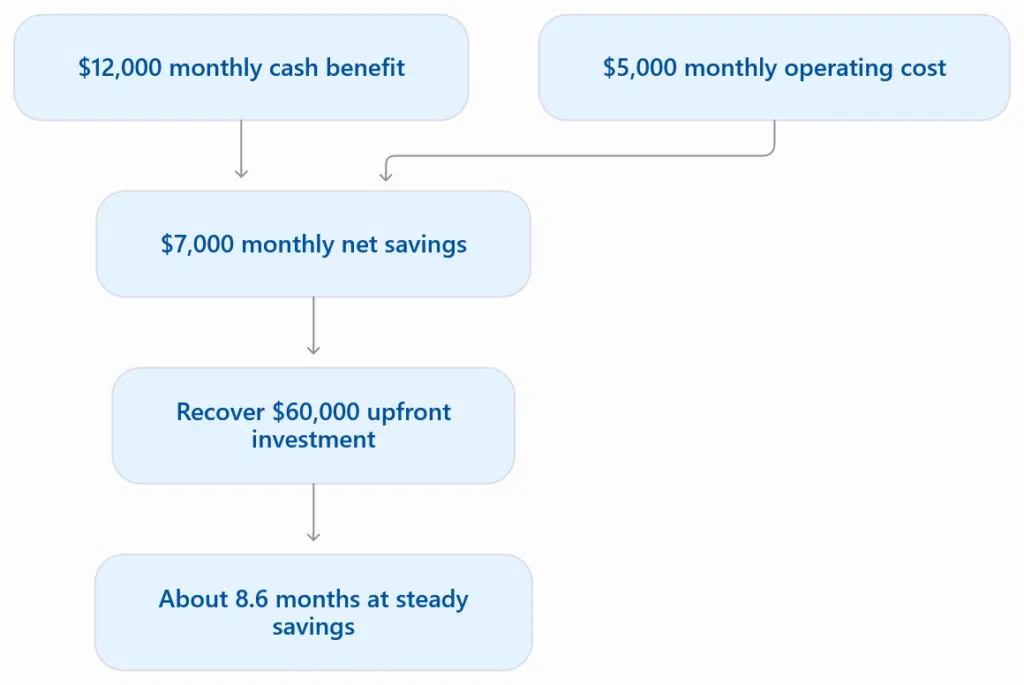
The scenario assumes benefits begin immediately and remain constant. A three-month delay, lower accepted volume or higher review burden changes the result. Replace every assumption with measured workload and contract evidence before approval.
| Sensitivity case | Monthly cash benefit | Monthly operating cost | First-year net benefit after $60,000 upfront cost | First-year ROI |
| Lower realized benefit | $8,000 | $5,000 | −$24,000 | −20% |
| Illustrative base case | $12,000 | $5,000 | $24,000 | 20% |
| Higher operating cost | $12,000 | $7,000 | $0 | 0% |
Review the Portfolio After Launch
Automation can create value beyond labor. Shorter queues, consistent evidence, extended processing hours and reduced dependence on undocumented knowledge may justify investment. Measure those outcomes in their own terms.
Temporary bridges need exit conditions. Review whether a supported API, workflow redesign or replacement application now removes the need for a bot. Retire automations whose economics, process or control case has expired.
Security, Financial Controls and AI Governance
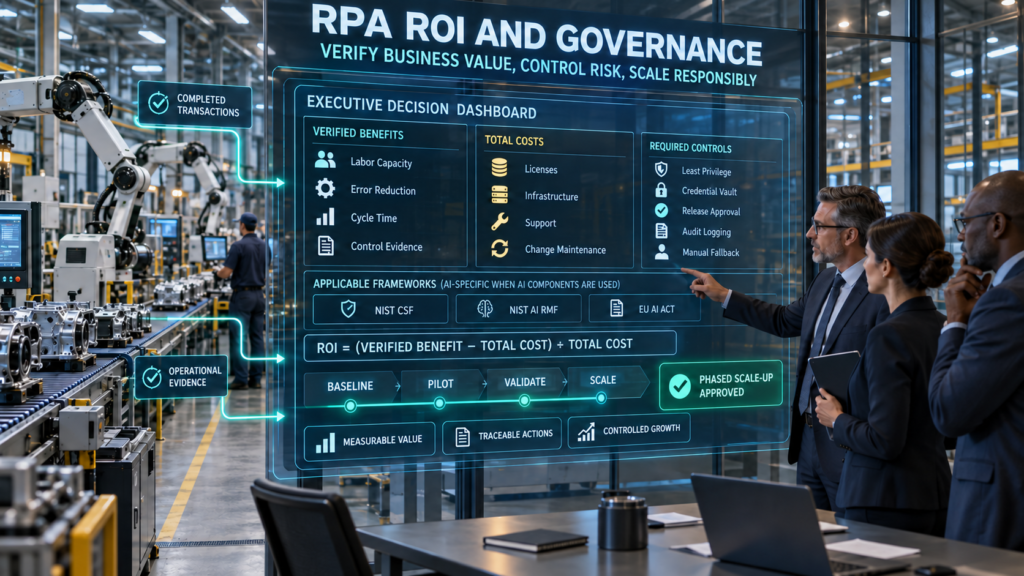
A software worker can become a powerful access path. It may read documents, reach shared drives and update financial systems at machine speed. Restrict its authority to the work it is approved to perform.
Protect Identities, Secrets and Evidence
Use individually accountable execution identities. Avoid shared employee credentials, and select supported service or non-interactive authentication arrangements. Do not weaken multifactor authentication simply to keep an unattended job running.
Vault secrets and test rotation. Limit network reach, protect execution machines and maintain emergency revocation procedures. Logs and screenshots should support investigation without reproducing passwords, tokens or unrestricted personal and payment data.
Use a lifecycle security framework. NIST CSF 2.0 organizes cybersecurity around Govern, Identify, Protect, Detect, Respond and Recover. Map those functions to automation ownership, dependencies, access, monitoring, incident response and tested restoration. NIST
Preserve Segregation of Duties
Digital execution does not remove financial-control obligations. A person who changes payment logic should not also approve its release, authorize the payment and erase the evidence. Small teams need documented compensating controls where full role separation is impractical.
Validate authority as well as data format. Correctly formatted fields do not authorize an unlimited payment or supplier change. Apply transaction limits, approval requirements and reconciliation.
Record the chain of responsibility. Preserve the package version, approver, execution identity, business key, relevant validation and target confirmation. Restrict evidence deletion and document retention requirements.
Apply AI Controls Where AI Is Used
NIST AI RMF provides a voluntary structure for governing AI risk. Use its Govern, Map, Measure and Manage functions to assign responsibility, define context, test outputs and address residual risks in extraction, classification or generation components. NIST
The OWASP Gen AI Top 10 is relevant to generative integrations. Prompt injection, sensitive-information disclosure, poisoning and excessive authority need concrete architectural controls. A risk checklist alone does not constrain a connected tool. OWASP Gen AI Security Project
ISO/IEC 42001 addresses AI management systems. It can support organizational governance, but management-system assurance does not establish a specific workflow’s transaction accuracy or legal compliance. AI management systems
Assess the EU AI Act by Intended Use
The label “RPA” does not determine regulatory classification. Assess whether a component meets the AI-system definition, its intended use, the organization’s role and any applicable high-risk category. Employment, credit and other listed uses require context-specific assessment rather than assumptions based on the vendor’s platform. Shaping Europe’s digital future
Keep implementation dates current. Commission guidance identifies revised application dates for relevant high-risk requirements, including 2 December 2027 for Annex III systems and 2 August 2028 for relevant AI embedded in regulated products. Other applicable obligations and laws need separate assessment. Shaping Europe’s digital future
A governance feature is not a compliance conclusion. The deployed purpose, permissions, data, documentation and operating practice determine the organization’s obligations.
A Controlled Pilot and Release Framework
Define the work before commissioning RPA implementation services. External specialists can build and support the system, but the organization must retain process ownership, acceptance authority and access to operational evidence.
| Gate | Required evidence |
| Define the process | Named owner, documented rules, boundaries and prohibited actions |
| Establish the baseline | Volume, active handling, queue time, rework, cash costs and control failures |
| Design execution | Supported interfaces, identities, state, verification and recovery behavior |
| Build and test | Versioned package, representative cases and deliberate failure scenarios |
| Validate operations | Review workload, monitoring, runbooks and credential rotation |
| Accept the economics | Cost per accepted transaction and separately reported benefit categories |
| Release selectively | Approved controls, fallback capacity and suspension criteria |
| Reassess | Results after application changes, workload shifts and supplier updates |
Maintain a Production Runbook
Operators need precise recovery instructions. Document how to pause schedules, stop new intake, inspect committed state, release queue ownership and replay eligible work safely. Include escalation contacts for both business and technical exceptions.
Separate configuration from code. URLs, timeouts, queue names and environment-specific settings should be controlled values. Changes to business rules still require appropriate approval even when they are stored as configuration.
Promote reviewed packages through distinct environments. Test shared-component changes and application upgrades before release. Direct production edits make it harder to establish what ran and whether the change was authorized.
Set Explicit Suspension Criteria
Stop expansion when uncertainty becomes routine. Repeated ambiguous outcomes, growing exception queues, unreliable target verification or uncontrolled application changes indicate unfinished engineering.
Suspend consequential execution after a critical control failure. Reconcile affected transactions before resuming, and preserve incident evidence. A rising throughput metric does not compensate for duplicated payments or unauthorized access.
Closing Takeaway
Robotic process automation is valuable when it produces correct, verified transactions and remains supportable as applications change. The strongest architecture combines supported integrations, controlled UI actions, explicit state, restricted identities and a workable human escalation path.
Begin with one measurable process. Establish the baseline, test the difficult cases and fund the operating model before expanding licenses. Scale when accepted outcomes, recovery performance and complete economics justify it.
Frequently Asked Questions
What Is Robotic Process Automation in Practical Terms?
It uses software workers to execute repeatable tasks across applications, usually through UI interactions, supported integrations or both. A production deployment also needs scheduling, credentials, transaction state, verification and exception handling.
How Does RPA Differ From Business Process Automation?
RPA commonly handles application-interaction tasks. Business process automation coordinates the broader workflow, including state, approvals and handoffs; the two can operate together.
Is RPA Artificial Intelligence?
Not necessarily. Explicitly programmed workflows can operate without AI, while document extraction, classification and generation introduce model-based uncertainty and additional validation needs.
Which Processes Are Best Suited to Automation?
Look for stable rules, repeatable work, reliable inputs, identifiable exceptions and a verifiable result. Repair ambiguous policies and poor master data before automating them.
What Is the Largest Hidden Cost?
Change maintenance is frequently underestimated. Application releases, identity changes, regression testing, duplicated components and exception support continue after the first build.
Can Bots Operate Without Human Approval?
They can execute approved, bounded transactions where the control design permits it. Consequential, unusual or uncertain cases need the review and authorization required by the organization’s policies and applicable obligations.
How Should an Organization Start?
Select one bounded process, measure its current performance and define acceptance criteria before development. Test outages, duplicate handling and manual recovery alongside normal execution.
Appendix and Research Integrity
Sources and Citations Index
| Source | Use in this article |
| Nielsen et al., benefits realization in supply chains | Organizational readiness and benefits-realization research |
| Wewerka and Reichert, systematic literature review | Assessment framework and research coverage |
| Průcha and Madzík, SiDiTeR | Process similarity and reuse research |
| Bainbridge, Ironies of Automation | Human responsibility and exception-handling challenges |
| Microsoft Power Automate pricing | Public plan prices and commercial scope |
| Microsoft licensing documentation | Execution-capacity entitlements |
| UiPath plans and pricing | Entry pricing and tier-specific features |
| Automation Anywhere products | Product-scope context |
| SS&C Blue Prism products | Platform and deployment context |
| NIST CSF 2.0 | Cybersecurity lifecycle |
| NIST AI RMF | AI risk management |
| OWASP Gen AI Top 10 | Generative-component security |
| ISO/IEC 42001 | AI management-system scope |
| European Commission AI Act guidance | Regulatory classification and implementation context |
| Google ML deployment testing | Production validation of AI components |
Editorial & Fact-Checking Disclosure
Evidence boundary. This article combines primary-source research, technical documentation and operational analysis. It does not report an independently conducted platform benchmark, customer deployment or audited financial result.
Financial boundary. The worked ROI and sensitivity scenarios are hypothetical. Benefits, costs and payback require verification against the buyer’s accepted transactions, staffing decisions, contracts and cash flows.
Research interpretation. Published study results describe their own methods and contexts. Background failure-rate estimates and process-similarity counts should not be treated as universal forecasts or guaranteed savings.
Review boundary. Public commercial information was checked for this rewrite on 27 October 2026. The supplied author metadata below remains unchanged and does not represent an additional independent editorial sign-off.
Research Limitations
Prices are snapshots. Regional terms, taxes, minimum commitments, infrastructure, application rights, AI consumption and support can change the total. Entry plans are not substitutes for a production bill of materials.
Technical success is narrower than business correctness. Acceptance testing must examine values, authorization, duplicate effects and recovery, not merely whether execution finished.
Governance requires operation. Frameworks, certificates and vendor controls support a program but do not establish that a specific deployment is accurate, secure or legally compliant.
Corporate Editorial Transparency and AI Usage Disclosure
AI-assisted tools were used to support research organization, drafting and language refinement. NezzHub retains editorial responsibility for the published article. Vendor inclusion does not constitute endorsement.
Author and Editorial Review
Author: Garikapati Bullivenkaiah
Technology research writer with LL.B., LL.M., M.A., and MBA qualifications. He writes about emerging technologies and their business, governance and legal implications. His multidisciplinary academic background informs his analysis of technology adoption, intellectual property, and organizational risk. His articles explain technical concepts and practical considerations for business owners, IT managers and technology decision-makers. LinkedIn Profile
Reviewed by: Chitikineni Ramadevi — Editor
Chitikineni Ramadevi holds an M.Sc. in Computers from Andhra University and has over 10 years of research experience in technology-related subjects. She reviews NezzHub articles for clarity, factual accuracy, source support and practical relevance.
Published by: NezzHub
Research approach: This article draws on primary sources, technical documentation and relevant industry research. References are provided within the article or its sources section.
Published: 04-14-2026
Last reviewed: 10-27-2026